
Assembly drawings
Описание
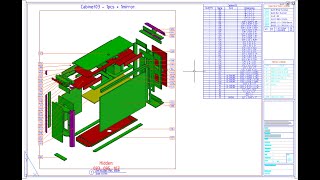
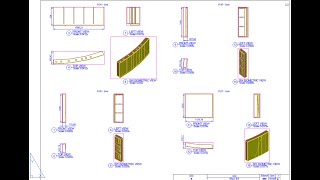
The Assembly Drawings program (AsmDraw command) is designed to automatically create sheets with assembly drawings, place all the necessary annotations, and fill in all the data in the blocks and tables of the sheet.
The program is useful primarily for designing exhibition stands, furniture, and other products consisting of a large number of simple assemblies. For example, a partition wall consists of dozens of different sections, each of which has ten to 20 parts. Designing drawings for each assembly is long and tedious. The program can do the work in 1 click that would take you many hours. You will only have to arrange the views more beautifully and move some dimensions and callouts to free spaces.
-
The program works only with assemblies in blocks. Blocks can contain any objects, including nested blocks. You can even try to use flat drawings in blocks.
-
Viewports are used to design views on sheets, and viewports show all the objects of the drawing. Therefore, there should be empty space next to the assemblies. To freely arrange copies of assemblies, the Expose Assemblies program is called.
-
Expose Assemblies can prepare exploded views of assemblies, in which internal parts are better visible (using the TNT program call).
-
The program itself will create sheets (layouts) for all assemblies. Each sheet can accommodate from 1 to 9 assemblies. The sheet can be renamed using the assembly names.
-
You can specify the location of future assemblies on the sheet by creating viewports in the sheet template.
-
All lines, blocks, tables, and tests that are in your sheet template will be cloned to each assembly sheet.
-
The program can create from 1 to 10 views from different sides for each assembly - up to six orthogonal views and up to four isometric views.
-
The program can arrange views according to European standards (GOST, DIN) and American (ISO) - configure the "Third view angle" switch.
-
Orthogonal views are automatically aligned with each other in location and scale.
-
The program adjusts the viewport size to the assembly size and enables clipping in the front and back. This will help hide adjacent assemblies, but you still won't be able to use assemblies from the main model.
-
You can set up frozen layers and thus hide unnecessary objects in assemblies. Layers are frozen only inside viewports, but not in the model.
-
For each assembly, you can create a text header with any data about the assembly.
-
Under each view, you can insert a block caption with the view direction, scale, and any other data. You need to create the block in advance.
-
You can call the Overall Dimensions program and create 3 assembly dimensions on two orthogonal views (not on isometric views).
-
You can call the Place Leaders program and mark the positions of all visible parts. Moreover, if the program cannot find visible points of parts on the specified view, it will look for this part on other views. Requires purchasing a license for Place Leaders.
-
You can fill all the attributes of all the blocks of the sheet with assembly and drawing data.
-
If you have tables in the sheet template, you can call the Fill in Tables command and create lists of all the parts or all the materials. Requires a license for Data Table or another AVC table command.
-
The program has a lot of settings. But for different types of assemblies, you can create different styles of settings, and you can quickly switch between them.
Описание пробной версии
To run the plugin, you will have to register account and top up your account balance or receive bonuses.
Then you can activate one of the licenses:
-
Unlimited license - 100 EUR. Free updates for 1 year.
-
The trial period is 20 days.
You may also need to pay for a license for the Place Leaders command and the Data Table command. But you do not need to install these plugins separately; just buy a license.
The AsmDraw command is also included in the A>V>C> Pro package.



Creates sheets, views, and annotations in one click — huge time saver
The best regards from Alex Misich
I'm truly grateful for your feedback. Please visit the Assembly Drawings page on our website—there's a detailed description of how to use the program, which didn't fit in the App Store.
Works perfectly, offers many flexible settings, and speeds up drawing production by saving hours of time. I use it constantly together with AutoCAD. I highly recommend everyone to try this tool.
Thanks for your feedback. You can ask any questions about AVC Assembly Drawings right here.