OpenSpace Two-Way Sync
Kostenlos
Sprache:
Beschreibung
OpenSpace's integration with Autodesk Construction Cloud® (ACC) transforms how project teams capture, track, and resolve field issues. Instead of toggling between disconnected systems or manually re-entering issue data, OpenSpace gives you a unified, real-time view of field issues created on-site and instantly synced to ACC.
No duplicate data entry. No wondering what's been logged where. Just seamless, bidirectional collaboration and faster issue resolution. Use OpenSpace's AI-powered, field-proven documentation tools to:
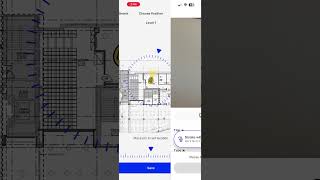
Capture Issues in the Field, Instantly Synced to ACC With Integrated Field Notes, field teams can create native ACC Issues directly from the OpenSpace mobile app, complete with photos and AI-powered location mapping onto project sheets. The moment an Issue is saved in OpenSpace, it's automatically created in the integrated ACC project. No manual exports, no copying and pasting, just field documentation that flows straight into your ACC workflow.
Two-Way Sync Keeps Everyone Aligned OpenSpace doesn't just push data to ACC, it stays in sync with it. Edits made in OpenSpace automatically update the corresponding ACC Issue, and changes made in ACC sync right back to OpenSpace. Your office teams, field crews, and project partners are always working from the same up-to-date record, regardless of which platform they're in.
Automatic PDF Reports on Every Issue Every Integrated Field Note triggers an automatic Field Note PDF report, complete with photos and issue details, attached directly to the corresponding ACC record. Documentation that used to take minutes now happens in seconds.
No duplicate data entry. No wondering what's been logged where. Just seamless, bidirectional collaboration and faster issue resolution. Use OpenSpace's AI-powered, field-proven documentation tools to:
Capture Issues in the Field, Instantly Synced to ACC With Integrated Field Notes, field teams can create native ACC Issues directly from the OpenSpace mobile app, complete with photos and AI-powered location mapping onto project sheets. The moment an Issue is saved in OpenSpace, it's automatically created in the integrated ACC project. No manual exports, no copying and pasting, just field documentation that flows straight into your ACC workflow.
Two-Way Sync Keeps Everyone Aligned OpenSpace doesn't just push data to ACC, it stays in sync with it. Edits made in OpenSpace automatically update the corresponding ACC Issue, and changes made in ACC sync right back to OpenSpace. Your office teams, field crews, and project partners are always working from the same up-to-date record, regardless of which platform they're in.
Automatic PDF Reports on Every Issue Every Integrated Field Note triggers an automatic Field Note PDF report, complete with photos and issue details, attached directly to the corresponding ACC record. Documentation that used to take minutes now happens in seconds.
Key Benefits:
- Create ACC Issues directly from the OpenSpace mobile app
- AI-powered location mapping pins issues to the correct spot on project sheets
- Two-way sync keeps Issues updated across OpenSpace and ACC in real time
- Auto-generated Field Note PDFs with photos attached to every ACC record
- View and edit Integrated Field Notes on desktop or mobile
- Eliminate manual re-entry with instant, automatic issue creation
Whether you're a project manager overseeing a large build or a field supervisor documenting issues on the go, the OpenSpace + ACC integration helps you capture, track, and close out field issues faster and more accurately than ever before. Start documenting smarter today.
Authentication: OpenSpace uses a secure service account (SSA) to retrieve and maintain integration data from Autodesk®. See here for details.
Support: Please visit us at https://support.openspace.ai for support information.
Contact us:support@openspace.ai
Informationen zu dieser Version
Version 1.0.0, 20.03.2026
Initial launch version to enable two-way sync capabilities between OpenSpace and ACC.