JT Magic Revolve
Descrizione
JT Magic Revolve is a powerful add-in for Autodesk® Fusion® that revolutionizes the way you create complex rotational patterns, spirals, and distributed structures. With independent translation and rotation axes, this tool opens up new possibilities for parametric design that go far beyond standard pattern features.
Transform Your Workflow
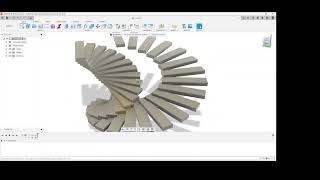
Create sophisticated helical gears, spiral staircases, threaded components, and decorative patterns with unprecedented control. JT Magic Revolve duplicates and transforms solid bodies along customizable paths, giving you the flexibility to choose whether rotation happens before or after translation—a critical distinction for achieving different geometric results.
Key Features
- Separate Axis Control: Unlike traditional pattern tools, JT Magic Revolve lets you specify independent translation and rotation axes. This means you can move bodies along one axis while rotating them around a completely different axis—perfect for creating complex mechanical assemblies or organic forms.
- Operation Priority Selection: Choose whether to rotate-then-translate (ideal for classic spirals and helical patterns) or translate-then-rotate (perfect for distributed circular arrangements). This simple but powerful option dramatically expands your design possibilities.
- Flexible Axis Selection: Work with construction axes, sketch lines, or body edges as your transformation references. The PRO version supports all axis types, while the trial version focuses on construction axes for learning the workflow.
- Parametric Integration: All transformations use native Fusion parameters and expressions, maintaining full design history and allowing dynamic updates. Your patterns remain fully editable and can be modified at any time through the timeline.
- Smart Body Management: Create new components to organize generated bodies, or work directly in the active component. Bodies are automatically named with progressive numbering for easy identification and management.
1000 body copies, support for all axis types including edges and sketch lines, automatic timeline grouping for cleaner history, and priority technical support. Designed for professional users who need maximum flexibility and power.
Perfect For
- Mechanical engineers creating gears, springs, and threaded components
- Architects designing spiral staircases and helical structures
- Product designers crafting decorative patterns and organic forms
- Anyone needing precise control over rotational transformations
JT Magic Revolve integrates seamlessly into your Fusion workflow, appearing in the CREATE menu alongside native commands. All operations use standard Fusion features, ensuring compatibility and predictable behavior.
Start creating impossible patterns today.