
Detail2Body – for Extracting Surface Details
Descrizione
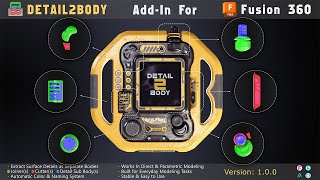
Detail2Body - Autodesk® Fusion® Add-in
Extract Surface Details as Separate Bodies
Detail2Body is a powerful Fusion add-in that extracts surface details from solid bodies and converts them into separate Joiner and Cutter bodies. Perfect for kit-bashing, 3D printing, and design reuse.
What Does It Do?
When you apply features like fillets, chamfers, or holes to a solid body, they become part of that body. Detail2Body reverses this process:
- Joiners — Extracted bodies representing added material
- Cutters — Extracted bodies representing removed material
- Sub-Bodies — Copy related bodies that are not combined with the source
Build Once, Use Everywhere!
Trial Version
- Select Source Body
- Selection Type (Features/Faces)
- Select Details
Full Version
Everything in Demo, plus:
- Detail Sub-Bodies
- Operation (New Body/New Component)
- Component Location (Source/Active/Root)
- Select Outputs
- Create Selection Sets
- Auto-Open Tools (Move/Copy, Scale, Move to Group)
- Custom Naming Prefixes
- Custom Colors for Joiners, Cutters, and Sub-Bodies
- More options for selections
- Auto-save settings and reset to default button
- and more..
Key Features:
Two Selection Modes
- Feature Mode — Select entire features from the timeline, fast and automatically
- Face Mode — Select individual faces manually for precise control
Smart Output Options
- Create a New Body or New Component
- Automatic color coding for easy identification
- Generate Selection Sets for quick re-selection
- Custom naming prefixes (Source Body, Component, File, Project, or Custom)
Workflow Integration
- Auto-open tools after completion (Move/Copy, Scale, Move to Group)
- Works in both Parametric and Direct Modeling modes
- Timeline grouping for clean history
- All settings are auto-saved between sessions
Full Customization
- Custom names for Joiners, Cutters, and Sub-Bodies
- Multiple color options for each body type
- Component location control (Source, Active, or Root)
- Result notifications with a detailed summary
How to Use?
- Select Source Body — Choose the solid body containing details
- Choose Selection Type — Features or Faces
- Select Details — Pick the features or faces you want to extract
- Optional: Add Sub-Bodies — Select related hardware or parts
- Click OK — Done, your Joiners and Cutters are ready
Perfect For
- Kit-bashing — Build modular detail libraries
- 3D Printing — Extract details for multi-material printing
- Design Reuse — Create reusable detail components
- Reverse Engineering — Analyze existing designs
What's Included
- Detail2Body Add-in files
- Ready to install and use
Requirements
- Fusion (Personal, Educational, or Commercial license)
- Windows or macOS
Coming from Other Software?
From CAD Software (SolidWorks, CATIA, Autodesk® Inventor®, etc.)
- Import your model as a STEP, IGES, or SAT file
- Your solid body is ready to use with Detail2Body
From 3D Software (Blender, Autodesk® 3ds Max®, Autodesk® Maya®, etc.)
- Import your mesh as an OBJ or STL file
- Convert the Mesh Body to a Solid Body first
- Then use Detail2Body on the converted solid
Support
For questions or support, please contact me via email: sup.cgtoolforge@gmail.com
Buy Full Version
https://www.cgtrader.com/designers/mahmoud-parsipour?referral_id=6412761


After installing
and launching Fusion 360, I now get an error message saying that the add-on is corrupted. Just to try it out. It is also not possible to uninstall it.
Hello, We understand your frustration and truly appreciate you reporting this issue. The installer and uninstaller are generated by the Autodesk App Store system and should follow the official Fusion standards. Installation and removal should work correctly using the same downloaded file. To help us understand the issue, could you please let us know: Are you using Windows or macOS? Are you running the latest version of Fusion or an older version? If possible, please send screenshots and additional details to sup.cgtoolforge@gmail.com so we can resolve the issue faster.