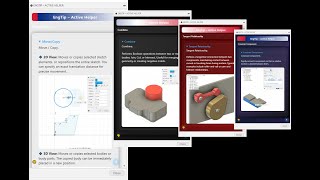
EngTip Active Helper
Descrição
EngTip Active Helper for Autodesk® Fusion® is a smart command assistant designed to help users understand and apply Fusion commands faster and easier.
It automatically opens a clean, responsive palette inside Fusion, where commands can be browsed or searched directly through a quick filter box.
When you click on any command, EngTip instantly displays a clear explanation, helpful tips, and a visual animation showing how the tool works in practice.
The add-in currently includes full coverage of the Design workspace commands, such as:
- Solid
- Surface
- Sheet Metal
- Mesh
And also the complete sets from Sketch, Assemble, Construction, Insert, Inspect, and Select.
To enhance the user experience, EngTip offers a Theme Selector button (bottom-left corner) to switch between multiple visual themes (Dark, Light, HunRed, Aurora).
Support and contact information can be accessed anytime via the Help button in the bottom-right corner.
Who is it for:
EngTip is ideal for new learners, CAD instructors, and professionals who want to master Fusion faster. It’s also a great reference companion for daily design workflows, keeping key functions always at your fingertips.
How it helps:
- Learn Fusion commands visually, without leaving the workspace.
- Quickly recall what a tool does before using it.
- Keep productivity high by eliminating the need to switch to browsers or PDFs.
Compatibility:
Tested on Windows 10 & 11 , with the October 2025 Fusion build.
Platform support: Windows
Author: Koszorus Attila (CadProfesszor)
Support: cadprofesszor@gmail.com