
Smart Slope Generator
Beschreibung
Smart Slope Generator v1.1.2
The ultimate slope patterning tool for Autodesk® AutoCAD® and Autodesk® Civil 3D® and verticals.
Overview
The Smart Slope Generator is a professional-grade automation plugin developed by Green Road Group. Specifically engineered for Civil Engineers and CAD Drafters, this tool transforms the tedious task of drawing embankment patterns into a fast, precise, and interactive process.
The Problem: 3D Distortion
Standard AutoCAD workflows often struggle with steep terrains. When patterns are calculated based on 3D geometry (high retaining walls or deep channels), lines often overlap or clump together in plan view, making drawings illegible.
The Solution: Precision 2D Projection
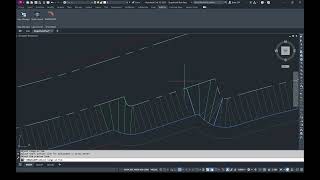
Our plugin solves this by projecting complex 3D geometry onto a planimetric 2D plane before distribution. This ensures that your slope lines are always cartographically correct, evenly spaced, and aesthetically pleasing, regardless of the elevation difference between the crest and the toe.
What’s New in v1.1.2?
1. Interactive Live Preview & Memory
No more "guess and check". The new Live Preview Canvas updates instantly as you adjust parameters, showing exactly how the pattern will look before you click "Draw". The plugin also features a Smart Memory System that remembers your last-used settings for a faster repetitive workflow.
2. Enhanced "Elastic" Algorithm
Our signature Elastic Algorithm has been upgraded. It not only distributes lines proportionally but also allows users to select and "fix" temporary patterns in complex intersections or messy geometry, ensuring perfect alignment in every corner.
3. Advanced Pattern Styling
Go beyond simple lines with professional drafting styles:
- Triangular Tapering: Draw slope lines as professional triangles instead of basic lines.
- Curtain Symbols: Automatically append Circles or T-Shape Ticks to short lines for specialized engineering standards.
- Stroke Variation: Choose between Long/1 Short, Long/2 Shorts, or Fixed patterns.
4. Smart Orientation & Backgrounds
- Auto-Orient: The tool intelligently detects the downhill direction and flips the pattern orientation automatically.
- Wipeout Support: Generate an integrated background hatch (Wipeout) beneath your pattern to cleanly hide underlying topography contours or messy base maps.
Technical Features
- Calculation Methods: Choose between Elastic, Proportional, Perpendicular, or Hybrid modes to match your specific engineering structure (e.g., natural terrain vs. concrete curbs).
- 3D Compatibility: Fully supports 3D Polylines and Civil 3D Feature Lines.
- Lightweight Output: Creates standard AutoCAD Line objects, keeping your DWG files small, fast, and 100% compatible with external partners.
- Seamless Integration: Now integrates directly into the official Autodesk "Add-ins" ribbon tab for a cleaner workspace.
Compatibility
Fully optimized for AutoCAD Verticals 2021-2026 and Civil 3D 2021-2026.
Note: This app uses a custom installer (and not the standard App Store installer).


Pretty similar to geo_slope (geo_otkos), but even better, with amazing interface. Everything is perfect about this one!
Finally a plugin that simplifies the creation of slope and embankment patterns. The 2D projection approach completely eliminates the common issue of distorted or overlapping lines when working with steep 3D terrain, producing clean and professional drawings every time. The live preview and smart memory features make the workflow fast and intuitive, while the elastic algorithm handles complex geometry with impressive precision. Advanced styling options and automatic orientation add an extra level of polish to the final result. Overall, it’s a powerful tool that saves drafting time for civil engineers and CAD technicians.