K-D2 PLANNER


Digitally signed app
説明
Plan safer lifts, faster—directly in Autodesk® Revit®.Cut hours from lift planning, reduce rework, and generate clear submittals your GC and safety team will approve.
By using K-D2 PLANNER, you can easily perform lift simulations such as capacity verification and collision checks, which can streamline your steel erection. These features enable the formulation of optimal crane work plans by evaluating feasibility, construction sequencing and durations, and selecting the right crane model for cost-effective execution. Why not try the trial version now?
The trial version comes preloaded with cranes from Kobelco Construction Machinery (the United States). Furthermore, All-terrain cranes and rough-terrain cranes from Tadano will be added in the future.
If you wish to simulate cranes from other manufacturers, our support team is available to assist you - please feel free to contact us. Additionally, if you have 3D models and capacity charts for your cranes, you can import them directly into K-D2 PLANNER yourself.
K-D2 PLANNER is already available in Japan and has received high praise.
“With precise analysis using K-D2 PLANNER, we were able to reduce documentation errors and the time needed for supervisor approvals, shortening our working time by about 20% compared to when we worked in 2D.“
— Site manager, equipment company
Need Support? We're Here to Help!
If you have any questions or need assistance, please don’t hesitate to reach out to us. Our support team is ready to help you make the most of your experience.
K-D2 PLANNER:THE 4D CRANE SIMULATOR | Kobelco Construction Machinery Global Website
K-D2 PLANNER for Revit includes:
-3D Graphics:
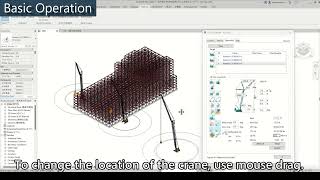
- High-fidelity 3D visualization lets you view the lift from any angle in Revit.
-Drawing export:
- Export plan and section views, including multiple crane angles, with one click. It is also possible to display a diagram of the crane's operating range.
-Visible Working and Tail Swing Radius:
- Displays maximum and minimum working radius and counterweight tail-swing radius.
-Crane Capacity:
- Displays the crane‘s Gross Rated Load, Lifting Capacity and the load factor when lifting materials.
-Ground Bearing Pressure:
- Reports maximum ground-bearing pressure, including conditions due to crane self-weight and during lifts.
-Real-Time Alerts:
- Alerts are displayed if the crane is overloaded or exceeds its operating range.
-Load & Rigging Details:
- Define material weights, rigging gear weights, and safety factors. Choose from three load-calculation methods: by volume & density, by parameters, or by direct input.
-Crane Library:
- Currently, Kobelco cranes come preloaded in K-D2 PLANNER and can be used. It is also possible to import and simulate cranes from other companies. If you have any requests, please contact us first.
-Crane Selection:
- Find your crane in just three steps.
- The most suitable and economical crane configuration for your site will be displayed at the top of the results list, saving you precious time.
- 4D Sequencing:
- Record each construction step with planned timing (time dimension) and associated lift data. Beyond 3D visuals, detailed lift information—load, rigging, utilization, and rated capacity—is logged automatically.
K-D2 PLANNER’s support
Kobelco Construction Machinery offers free support from specialized engineers to help you make the most of K-D2 PLANNER's functions. Please feel free to use it!
1. Preliminary Preparations
We collect your 2D plans (planning and shoring) and 3D models
(buildings and load charts not yet integrated).
2. Study
Our dedicated engineers use the K-D2 PLANNER to analyze and plan each step of the construction process.
3. Evaluation of Study Results and Benefits
We conduct a joint assessment of the verification process and the expected benefits of implementation.
The Paid version has been available in Japan since April 2023. If you are interested, please contact k-d2.support@kobelco.com.
Note: This app uses a custom installer (and not the standard App Store installer).
体験版の説明
This is the English version with the same features as the product version sold in Japan. After installation, you can use K-D2 PLANNER for 30 days.