CRXAI
Описание
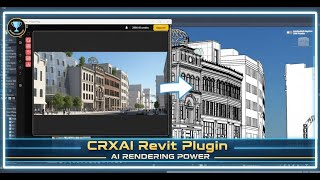
CRXAI is an AI-Powered add-in for Autodesk® Revit® that helps architects, designers, and educators generate visualizations and design outputs directly from their Revit models. The add-in integrates seamlessly into the Revit interface, enabling users to enhance presentation, concept development, and design communication workflows without leaving Revit.
CRXAI installs as a standard Revit ribbon panel and operates using the Revit .NET API. Users can select Revit views, sheets, or camera perspectives and submit them for AI-assisted processing. The generated outputs are intended to support early-stage design exploration, visualization, and presentation workflows.
Key Features
- AI-assisted generation of architectural visualizations from Revit views
- Seamless integration into the Revit ribbon interface
- Supports selected views, sheets, and model-based perspectives
- Cloud-based AI processing with user-initiated actions only
- Non-destructive workflow — original Revit models remain unchanged
- Compatible with specific Revit versions as listed in the app details
Workflow Overview
- Launch CRXAI from the Revit ribbon
- Select a view, sheet, or camera perspective
- Configure generation options
- Generate AI-assisted visual outputs
- Use results for presentations, concept studies, or design review
CRXAI reads only the data explicitly selected by the user through supported Revit API methods. No automatic background data extraction occurs. The add-in does not modify Revit model data unless explicitly instructed by the user.
Security and Compliance
CRXAI respects Autodesk platform guidelines and user privacy. All processing is initiated by the user, and data transfer is limited to what is required to deliver the requested functionality. The add-in does not bypass Autodesk licensing mechanisms or interfere with Revit’s core systems.
Target Users
- Architects and architectural designers
- BIM professionals and visualization specialists
- Educators and students using Revit in academic settings
Licensing
CRXAI may be offered with free credits, trial access, or subscription-based plans depending on the selected license. Licensing and usage terms are clearly communicated within the application.
Supported Platforms
- Revit (supported versions listed on the app page)
- Microsoft Windows
CRXAI is designed to enhance Revit-based design workflows by providing AI-assisted visualization tools while maintaining stability, transparency, and compatibility with Autodesk products.
Описание пробной версии
CRXAI does not offer a time-limited trial. Instead, the application provides a Free subscription tier with limited functionality, which serves as an evaluation option for users.
The Free subscription allows users to install and use the CRXAI Revit add-in with access to core features, subject to usage limits such as a restricted number of AI generation credits and limited feature availability. This enables users to explore the workflow, interface, and integration with Autodesk Revit before choosing a paid subscription.
In addition to the Free tier, CRXAI offers Educational subscriptions at no cost to eligible students and educators for academic and teaching purposes. Educational access is subject to fair-use limits and is not intended for unrestricted commercial use.
Paid subscription plans are available for users who require higher usage limits, extended features, or commercial use. Users may upgrade at any time from the Free or Educational tiers within the application.
All plan types, usage limits, and licensing conditions are clearly communicated within the CRXAI interface.