
CAD TaskPad
Win64, EnglishGeneral Usage Instructions
General Usage:
- Launch AutoCAD.
- Click the "CAD TaskPad" button in the "Plug-ins" tab on the ribbon, or type TASK in the command line and press Enter.
- The CAD TaskPad palette will appear.
- Todo List: Enter a task in the text box and click the "Add" button. You can set priority (High / Medium / Low) and organize tasks into folders.
- Memo: Click the "New" button to create a new memo. Multiple memos are supported.
- Drawing Info: Check the current drawing file information in the "Drawing Info" tab.
- From the menu (≡), you can sort, switch display modes, and configure settings.
MCP Connection Setup (AI Agent Integration)
Open "MCP Connection Settings" from the menu (≡).
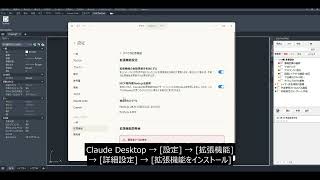
For Claude Desktop: Click "Save MCP Config File" to save the .mcpb file, then load it from Claude Desktop app [Settings] → [Extensions] → [Advanced] → [Install Extension].
For Claude Code: Run the displayed one-liner command in the terminal, or save the JSON config to your project's .mcp.json.
For Cursor: Copy the JSON config and paste it into Settings → Tools & MCP → Add custom MCP server.
After connecting via MCP, AI agents can add, edit, delete, and list Todos and memos.
Screenshots


Commands
| Ribbon/Toolbar Icon | Command | Command Description |
|---|---|---|

|
TASK |
Displays the CAD TaskPad palette. Manage Todo lists, memos, and drawing metadata. |
Installation/Uninstallation
The installer launched when you downloaded this Plug-in from the Autodesk App Store will begin the installation. Alternatively, double-click the downloaded installer to install the app/plug-in. You will need to restart your Autodesk product to enable the app/plug-in. To uninstall this plug-in, exit your Autodesk product if it is currently running, then re-run the installer and select the [Uninstall] button. Or, click [Control Panel] > [Programs] > [Programs and Features] (Windows 10/11) to remove the application from your system.
Additional Information
Known Issues
Contact
Author/Company Information
Support Information
Version History
| Version Number | Version Description |
|---|---|
|
1.0.0 |
First release. |
