
View11 - true scale view
Win64, EnglishGeneral Usage Instructions
Run the View11 command in the command prompt to launch the application.
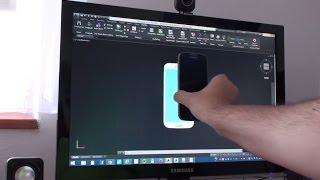
When run the first time in a session, tt will prompt for the diagonal size of your primary monitor (e.g. 24"), for the requested scale (by default 1:1) and then it will automatically zoom your drawing to show objects in true scale, so that you can really "measure" them as they are displayed on your screen. The calculated monitor and pixel size is displayed (based on the Windows system values).
In the true scale, you get better context of the designed product.
Screenshots


Commands
| Ribbon/Toolbar Icon | Command | Command Description |
|---|---|---|

|
VIEW11 |
Zoom the view to true scale based on the monitor diagonal. |
Installation/Uninstallation
The installer that ran when you downloaded this app/plug-in from the Autodesk App Store will start installing the app/plug-in. OR, simply double-click the downloaded installer to install the app/plugin.
You may need to restart the Autodesk product to activate the app/plug-in.
To uninstall this plug-in, exit the Autodesk product if you are currently running it, simply rerun the installer, and select the "Uninstall" button. OR, click Control Panel > Programs > Programs and Features (Windows 10/11) and uninstall as you would any other application from your system.
Additional Information
Known Issues
Contact
Author/Company Information
Support Information
Support via www.cadforum.cz - for feedback, or requests for enhancements.
Version History
| Version Number | Version Description |
|---|---|
|
1.2.0 |
added AutoCAD 2027 support without changing the version number first version for App Store. |
