
Tectonix - Procurement
, EnglishTectonix Limited
Tectonix - Procurement: Complete Autodesk Construction Cloud®- integrated tender management platform for construction projects with real-time collaboration and document control.
General Usage Instructions
Tectonix – Procurement
Usage Instructions
Streamline your procurement lifecycle directly within Autodesk Construction Cloud.
Quick Start
- Login: Sign in using your Autodesk ID (SSO).
- Hub Selection: Choose your target ACC hub to sync context.
- Project Sync: Import active projects from ACC into BIMGOAI.
- User Mapping: Map ACC users to BIMGOAI roles (Admin, Tender User).
- Create Package: Launch your first tender package.
Core Workflows
Procurement Strategy
- Dashboard Overview: Track active tenders and pending submissions across projects.
- Tender Event Schedule (TES): Define and manage procurement timelines and milestones.
- Package Creation: Generate tender packages with specific scopes and requirements.
- Document Sync: Select files directly from ACC Docs to attach to tender packages.
Tender Management
- Bidder Invitation: Invite vendors and assign them to specific packages.
- Submission Tracking: Monitor vendor upload status in real time.
- Review & Award: Evaluate submissions and manage the awarding process.
- Activity Logging: View detailed audit trails of all user actions.
Role-Based Workflows
Hub & Project Admins
- System Configuration: Manage hub settings and project integrations.
- User Management: Control access levels (App Admin, Project Admin, Tender User).
- Master Schedule: Oversee the Tender Event Schedule (TES) for all packages.
- Approval Workflows: Review and approve tender documentation before release.
Procurement Managers
- Package Execution: Manage the day-to-day tender process.
- Vendor Communication: Handle inquiries and clarifications.
- Document Control: Ensure correct file versions are synced from ACC.
Tender Users (Vendors)
- Secure Portal: Access assigned tender packages via a dedicated interface.
- Requirement Review: Download specifications and project documents.
- Submission Upload: Securely upload bids and required documentation.
ACC Integration
- Single Sign-On: Seamless authentication via Autodesk Construction Cloud.
- Document Bridge: Direct access to files stored in ACC Build and Docs.
- Project Mirroring: Automatic synchronization of project lists and details.
- User Sync: Import team members directly from your ACC hub directory.
Advanced Features
Automation & Control
- Status Automation: Automatic status updates based on timeline triggers.
- Permission Gates: Strict access control ensuring vendors only see their assigned packages.
- Audit History: Comprehensive logs for compliance and transparency.
- Bulk Tools: Efficiently manage multiple tender packages simultaneously.
Support & Help
- Email Support: support@tectonixai.com
- Documentation: Access user guides within the application.
- Updates: Regular feature enhancements compatible with ACC APIs.
System Requirements
- Autodesk Construction Cloud account (Build or Docs subscription)
- Active internet connection
- Modern web browser (Chrome, Edge, Firefox, or Safari)
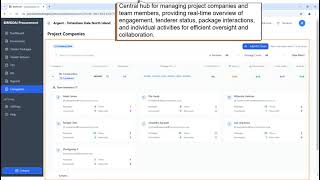
Screenshots



Commands
Installation/Uninstallation
Additional Information
Known Issues
Contact
Company Name: Tectonix Limited
Company URL: https://www.tectonixai.com/
Support Contact: support@tectonixAI.com
Author/Company Information
Tectonix Limited
Support Information
How to Get Help with BIMGOAI – Procurement
Primary Support
- Email: support@tectonixai.com
- Response Time: Within 24 hours (business days)
- Business Hours: Monday–Friday, 9:00 AM–6:00 PM (UK time)
Self-Service Resources
- User Manual: A comprehensive guide available within the application settings.
- Video Tutorials: Step-by-step workflows for Procurement Managers and Vendors.
- Knowledge Base: Searchable articles covering hub setup and tender configurations.
- FAQ: Quick solutions for common synchronization and permission-related questions.
Common Support Topics
- ACC Integration: Troubleshooting hub connections and project synchronization.
- User Access: Assistance with App Admin vs. Project Admin role assignments.
- Tender Packages: Support with Tender Event Schedule (TES) setup and package publishing.
- Vendor Access: Resolving login or document visibility issues for bidders.
- Data Sync: Addressing real-time update issues with Autodesk Construction Cloud.
System Requirements
- Autodesk Construction Cloud account (Build or Docs)
- Modern web browser (Chrome, Firefox, Safari, or Edge)
- Stable internet connection for real-time synchronization
Version History
| Version Number | Version Description |
|---|---|
|
1.0.0 |
Initial release with core procurement management features, ACC integration, and multi-role user management |
