
IMAGINiT Clarity Cloud
, EnglishGeneral Usage Instructions
In the Autodesk Construction Cloud®, Account Administrators will find the app under the "Apps" tab. Select "Install" to add it to your account.
- Users will sign up for an account with IMAGINiT.
- Once their company has been provisioned, in the "Integrations" section, an administrator will set up one or more Autodesk user credentials to use for automation. This enables ClarityCloud to choose from the BIM 360/ACC Projects that the credentials can see.
- Administrators will then be able to setup Clarity projects which match their BIM 360/ACC projects, and add users to the projects.
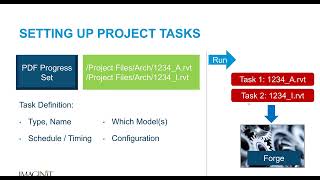
- Within each Clarity project, a user defines tasks for automation that should happen on-demand or on a schedule.
- ClarityCloud uses Autodesk Platform Services/Design Automation to automate manual tasks like Print/Export from Revit and AutoCAD. (The automation will open the relevant files from BIM 360/ACC to perform actions on them - either the published Revit models, or the live Revit models - based on the configuration of the project).
Screenshots


Commands
Installation/Uninstallation
Additional Information
This app is Clarity Cloud (the Software-as-a-Service version). You can find out more about the on-premise verison of Clarity here: https://imaginit.com/clarity.
Known Issues
Tasks performed by Autodesk Platform Services / Design Automation have some limitations based on running in the cloud. For example, it is not possible to use a PDF driver within the cloud environment - because of that, Revit to PDF is only available in Revit 2022 and higher (when Autodesk added the direct PDF export capability). APS / Design Automation supports opening live BIM 360/ACC models in Revit 2022 and higher - in all other cases a published copy of the model will be opened.
Many of these issues can be worked around by using the option to perform some tasks with an on-premise copy of Revit (additional costs apply).
Contact
Author/Company Information
Support Information
IMAGINiT Technical Support is available from 8am to 8pm US Eastern Time:
Email: support@rand.com
Phone: +1 888-528-4765 (+1 402 451-1212).
Version History
| Version Number | Version Description |
|---|---|
|
2026.0.0 |
Support for access to Live Revit models in ACC/BIM 360, in Revit 2022 and higher. Older Revit versions support processing tasks on Published Revit Models. Support for optionally processing tasks with an on-premise copy of Revit (live or published). |
