
Tangible Materials
, EnglishTangible Materials
Tangible empowers construction teams with the data they need to make confident decisions.
General Usage Instructions
Connect your Autodesk Construction Cloud® account to Tangible and import any project with a single click. Tangible handles the rest by performing fast, accurate quantity takeoffs and unlocking insights across your project.
Teams can import project data on demand or at designated design milestones to understand the impact of decisions on cost, carbon, and other performance metrics. Primary use cases include takeoffs for cost control, carbon emissions tracking, and evaluating the impact of design changes over time.
How does it work?
- Admin installs the Tangible App in Autodesk®.
- In the Tangible app, create a new project or version to import data into.
- Select from a list of ACC projects you have access to.
- Choose the project to begin importing data. Tangible will import the latest version of your models and drawings on the project and kick off AI takeoffs.
Workflow
- Set up access: In the Autodesk App Store, an account administrator installs the Tangible app in ACC. Tangible users then gain access to any projects they already have permission to view in Autodesk.
- Create project: From the Tangible app, users within an organization workspace can create projects from Autodesk with one click. Creating a project triggers Tangible’s AI-powered takeoffs. The AI Takeoff agent reads relevant project documents, including Autodesk® Revit® models, PDF drawings, specifications, and Environmental Product Declarations (EPDs) containing carbon information for materials.
- AI-powered quantity takeoffs: Takeoffs include the building’s structure and enclosure by default, with the option to include additional systems such as interiors, site, and MEP. The Takeoff agent matches families to assemblies and, where available, uses PDF documents to customize assemblies to match design intent. When PDF drawings are unavailable, default assumptions and values are applied.
- Data quality assurance: All extracted data goes through a quality assurance process to ensure AI assumptions align with the best available project information.
- Data insights: Users receive an email notification with insights about the building, along with high-level performance metrics extracted from the data.
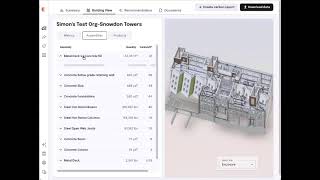
- Use data for decision-making: Users can browse structured data side by side with a 3D model, when available, allowing them to visualize assemblies, products, and metrics in context. Teams use this data to gain a granular understanding of material quantities, identify design inefficiencies, and compare current designs against internal standards. The data support collaborative decision-making and design optimization discussions.
- Repeat the process: Takeoffs can be repeated at major design milestones or on demand as teams seek to understand the impact of design changes over time. Data and insights are shared with team members to provide real-time access to the information they need.
See https://docs.tangiblematerials.com/ for more details.
Screenshots


Commands
Installation/Uninstallation
Additional Information
Known Issues
Contact
Company Name: Tangible Materials
Company URL: https://tangiblematerials.com/
Support Contact: support@tangiblematerials.com
Author/Company Information
Tangible Materials
Support Information
Contact support@tangiblematerials.com at any time.
Version History
| Version Number | Version Description |
|---|---|
|
1.0.0 |
Initial release |
