
Outlook Integration for Autodesk® Forma® by MWF
, EnglishGeneral Usage Instructions
How to install the app
-
Open Outlook Integration for Autodesk Forma by MWF in the Microsoft Marketplace here
-
Click “Get it now.” The app will be added to your Microsoft account
-
Open Microsoft Outlook (Web or Desktop)
-
Open any email
-
Find and click the Apps button in the email header panel
-
Click the Outlook Integration for Autodesk Forma icon - the app will appear in the side panel
-
Accept the app’s requested permissions
-
On the Grant Consent screen, click Continue
-
In the requested permissions window, click Accept
-
-
You will see the Welcome screen with the Log in to Autodesk Forma button. Click it, complete the login and allow Autodesk permissions
- Recommended for full functionality:
- Log in to Autodesk Forma as Account Admin (or ask your Account Admin to do this), then find Apps category in side panel
- Find Outlook Integration for Autodesk Forma app
- Open it and click Install
- In the opened window click Authorize and Install. This will unlock some of the apps functionality - like assigning Autodesk Forma Issue to other users, mention others in comment etc. If the app is not authorized, some information in the app will be unavailable
Using the app
-
Next, make sure you have opened any email you receive from Autodesk Forma regarding an Autodesk Forma issue (assignee changes, status changes, etc.)
-
You may see a warning that app functionality is limited until it is authorized by an Autodesk Forma Admin. You can continue using the app, but some information (such as changing issue assignees) will be unavailable until authorization is complete, because user information becomes available only after Autodesk Forma Admin approval
-
Once an email containing an Autodesk Forma issue is opened, the app will automatically display extended issue information with the ability to modify it. You can view and edit the issue, leave comments, and more - directly from Outlook
Screenshots
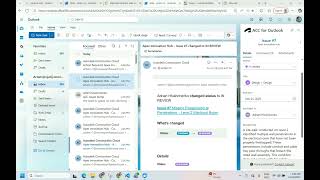


Commands
Installation/Uninstallation
Additional Information
Known Issues
Contact
Author/Company Information
Support Information
Reach out to the Move Work Forward SOC 2 Type II compliance partner at support@moveworkforward.com
Version History
| Version Number | Version Description |
|---|---|
|
1.0.1 |
This app is free. |
|
0.2 |
This app is free. |
|
0.1 |
Initial version |
