
BoxLock - Lockout Tagout (LOTO)
, EnglishGeneral Usage Instructions
Autodesk Construction Cloud® Admins can find the BoxLock - Lockout Tagout (LOTO) in ACC Account Administration under the “Apps” tab. Select "Install" to add it to your account.
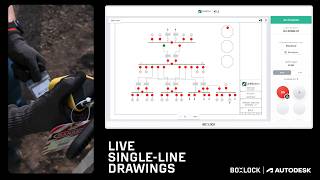
Begin by preparing your single-line drawings and identifying all required isolation points within Autodesk Construction Cloud (ACC). These drawings form the digital foundation for your Lockout Tagout (LOTO) program, ensuring the system layout and isolation locations are clearly represented before field activity begins. Once your drawings are ready, connect your Autodesk account within BoxLock Control. This secure connection allows BoxLock to automatically import the isolation points from ACC and map them into BoxLock Control as LOTO Locations, eliminating manual data entry and ensuring consistent tagging across platforms.
After the import is complete, you can assign a BoxLock Connected Padlock and/or BoxLock LOTO Tag to each LOTO Location. These devices and tags act as the physical enforcement mechanism for each Isolation Point, ensuring that every action in the field has a digital counterpart. From here, BoxLock takes over the real-time synchronization of safety conditions: whenever a lock is applied, removed, or verified in the field, BoxLock immediately updates the Energized/De-energized state of that location inside ACC. This provides instant feedback to engineers, coordinators, and safety personnel reviewing the single-line drawings, allowing them to monitor progress without relying on phone calls, messages, or manual markup.
As work proceeds, BoxLock automatically generates a complete Hazardous Energy Control (HEC) log for every Isolation Point. This includes the time a lock was applied, the user who performed the action, verification steps, removal events, and any additional status changes. These logs are invaluable for safety compliance, commissioning workflows, turnover documentation, and post-event analysis. Because each log is tied directly to a digital LOTO Location and a physical lock or tag, the system maintains a verifiable audit trail without the need for paper forms or redundant data entry.
Throughout the workflow, BoxLock seamlessly integrates into the user’s existing routines. Field technicians operate the locks and tags as they normally would, while supervisors and project engineers view the live isolation status directly in ACC. This ensures that both the physical and digital aspects of the LOTO process remain aligned, reduces the risk of miscommunication, and enhances coordination across trades. By automating status management and documentation while keeping drawings continuously accurate, the BoxLock integration provides a streamlined, transparent, and safety-centered workflow that supports complex industrial and commercial projects from initial setup through final commissioning.
Screenshots


Commands
Installation/Uninstallation
Additional Information
Known Issues
Contact
Author/Company Information
Support Information
Support Information is available at:
BoxLock Control Documentation
Contact Someone on our Team:
BoxLock Control Contact Form
Version History
| Version Number | Version Description |
|---|---|
|
1.0.0 |
Initial Autodesk App Store release. |
