Outlook Integration for Autodesk® Forma® by MWF
Free
Language:
Description
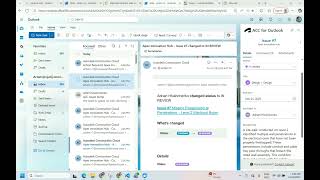
Outlook Integration for Autodesk® Forma® lets you view and manage Autodesk Forma (formerly Autodesk Construction Cloud®) issues, attachments, and related details directly from your Outlook inbox. Instead of switching between email and Autodesk Forma, you can review, update, and move issues forward right where project conversations already happen.
HOW TO INSTALL THE APP
How to install Outlook Integration for Autodesk Forma - Guide
KEY BENEFITS
- Eliminate context switching by reviewing Autodesk Forma issues directly in email
- Turn emails into action by updating issues while reading or replying
- Keep issue status, ownership, and deadlines up to date without opening Autodesk Forma
- Reduce delays and missed updates caused by back-and-forth communication
HOW IT WORKS
- Install Outlook Integration for Autodesk Forma from the Microsoft Marketplace here.
- Open an email that contains Autodesk Forma issue links or notifications from Autodesk Forma about issue changes.
- Open the Apps menu in Outlook and select Autodesk Forma for Outlook to open it in the sidebar.
- View and update issue details instantly without leaving Outlook.
AUTHENTICATION
Uses Autodesk 3-legged OAuth (user sign-in, started via 'Log in to Autodesk Forma') to access Autodesk Forma projects and issues. The Autodesk Forma APIs used:
- Account Admin (Get Basic Project and User info to allow assignee to change and mention users in comments)
- Issues (Get Autodesk Forma Issues)
- Locations (Get Locations).