OpenSpace
Ingyenes
Nyelv:
Leírás
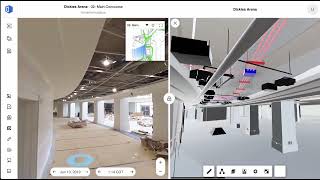
OpenSpace's integration with Autodesk Construction Cloud® (ACC) connects your visual documentation directly to the tools your project teams already rely on. From importing BIM models to linking field observations to RFIs and Issues, OpenSpace eliminates the gaps between the field and the office so every stakeholder has the context they need, right where they need it.
No more switching between platforms to track down model versions, attach field photos, or find the latest RFI status. Just connected workflows from the field to ACC. Use OpenSpace's cloud-based visual documentation platform to:
Import BIM Models Directly from ACC or Autodesk® BIM 360®. With OpenSpace BIM+, you can import models directly from ACC Build or BIM 360 Docs without ever leaving the cloud. Simply log in via Autodesk SSO, link your project, and import your desired file in just a few clicks. OpenSpace automatically aligns your model to project sheets that have captures, and when a new model version is published in Autodesk, an Update button activates so you can pull in the latest version instantly. Revit Workshared models are fully supported.
Link Field Notes to ACC RFIs and Issues. Turn any OpenSpace Field Note into an ACC RFI or Issue with a single workflow. From the Field Note, select the Autodesk Construction Cloud integration to create a new RFI or Issue, or link to an existing one. OpenSpace automatically generates a Field Note PDF report and sends it to ACC along with all associated images, floor plan location, and visual context. Every stakeholder in ACC gets the full picture without needing to request it separately.
Access OpenSpace Directly Inside ACC Build. With the OpenSpace Partner Card for ACC Build Project Home, your team can access virtual walkthroughs, captures, high-resolution images, and Field Notes without ever leaving Autodesk. Simply add the OpenSpace card to your ACC Build project, configure it with your OpenSpace project link, and your visual documentation is available right alongside your other project data.
Key Benefits:
- Import BIM and 3D models directly from ACC Build or BIM 360 Docs via cloud-to-cloud transfer
- Detect and pull in new model versions as they're published in Autodesk
- Link Field Notes to new or existing ACC RFIs and Issues in just a few clicks
- Auto-attach Field Note PDFs, images, and floor plan context to every linked RFI or Issue
- Access OpenSpace captures and Field Notes directly from ACC Build Project Home
Whether you're a BIM manager keeping models current or a field supervisor documenting and escalating issues on the go, the OpenSpace + Autodesk Construction Cloud integration keeps your visual documentation connected to every part of your project workflow. Start working smarter today.
Authentication: OpenSpace uses Autodesk SSO and a 3-legged OAuth token to connect with ACC and access project data, models, documents, and related records.
Support: Please visit us at https://support.openspace.ai for support information.
Contact us: support@openspace.ai
Verzióinformáció
Verzió 2.00, 2026. 03. 05.
Sign in with ACC credentials and import models directly from ACC into OpenSpace.