
EngTip Active Helper
Win64, EnglishGeneral Usage Instructions
How to use EngTip Active Helper:
After installation, restart Fusion.
- Open the Fusion top ribbon and navigate to Utilities → Add-Ins → Scripts and Add-Ins → Add-Ins tab.
- Locate EngTip Active Helper in the list and click Run.
- A floating palette will appear on the right side of the workspace.
- Use the search box to quickly find any command or browse through categories.
- Click a command name to display a detailed explanation, animation, and helpful usage tips.
Each EngTip entry includes:
- Command purpose and context
- Short usage guide
- Common mistakes to avoid
- Animated demonstration (GIF) showing tool behavior
The palette is interactive and always stays synced with the active Fusion environment, so you can explore tools while working on your model.
Theme customization:
- Use the Theme Selector button in the lower-left corner to change between Dark, Light, HunRed, and Aurora styles. The palette instantly updates without a restart.
Help & Support:
- Click the Help icon in the bottom-right corner to access documentation or contact the developer directly.
Tips:
- You can keep EngTip open while modeling – it auto-resizes with Fusion windows.
- Combine the search with partial keywords (e.g., “chamf” finds Chamfer).
- Works perfectly with both mouse and touchscreen setups.
EngTip integrates seamlessly into the Fusion workflow, acting as an always-available reference guide and learning companion for all design tasks.
Screenshots


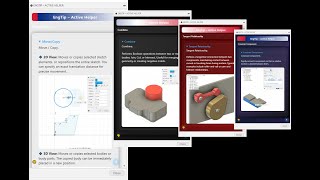
Commands
Installation/Uninstallation
Windows:
The installer that ran when you downloaded this app/plug-in from Autodesk App Store will start installing the app/plug-in. OR, simply double-click the downloaded installer to install the app/plugin.
You may need to restart the Autodesk product to activate the app/plug-in.
To uninstall this plug-in, exit the Autodesk product if you are currently running it, simply rerun the installer, and select the "Uninstall" button. OR, click Control Panel > Programs > Programs and Features (Windows) and uninstall as you would any other application from your system.
Additional Information
The EngTip Active Helper is designed to enhance the daily workflow of Fusion users by providing live command explanations, tips, and visual examples directly inside the software.
Future updates will include:
- Extended command coverage for Drawing and Simulation workspaces
- Optional multi-language support (Hungarian, German)
- Integrated short tutorial videos.
For updates and tutorials, please visit: https://cadprofesszor.hu
Known Issues
No major issues reported in version 1.0.1.
If any unexpected behavior occurs, please contact: cadprofesszor@gmail.com
Contact
Author/Company Information
Support Information
Technical Support:
For any questions, issues, or feedback regarding the EngTip Active Helper, please contact us at:cadprofesszor@gmail.com
Availability:
Support is available Monday–Friday, 9:00–18:00 (CET).
All inquiries are usually answered within 24 hours.
Documentation & Help:
Quick instructions and a privacy statement are available at:https://cadprofesszor.hu/addin_privacy
We are happy to help you get the most out of EngTip and Fusion!
Version History
| Version Number | Version Description |
|---|---|
|
1.0.1 |
Initial release of EngTip Active Helper. Includes English command descriptions, animated tool previews, and theme selector support (Dark, Light, HunRed, Aurora). Tested in Fusion (November 2025 build) on Windows 10. |
