
JT Magic Revolve
Win64, EnglishGeneral Usage Instructions
JT Magic Revolve integrates seamlessly into Fusion as a native command in the CREATE menu, located in the SOLID tab alongside other modeling tools.
Accessing the Command:
- After installation, launch Fusion and open any design file with solid bodies. Navigate to the SOLID workspace and click on CREATE in the toolbar. You'll find JT Magic Revolve listed with other creation commands. Click it to open the command dialog.
Step-by-Step Workflow:
1. Select Body to Duplicate: Click on any solid body in your design. The original body remains unchanged—all operations create new copies. You can select bodies from the browser or directly from the viewport.
2. Choose Translation Axis: Select the axis along which body copies will move. This can be any construction axis (X, Y, Z), sketch line, or linear edge. The axis direction determines whether copies move in a positive or negative direction based on your distance value.
3. Choose Rotation Axis (Optional): Select the axis around which bodies will rotate. If left empty, the translation axis is used. Using different axes for translation and rotation enables complex helical patterns and non-standard spirals.
4. Set Operation Priority, Choose the transformation order:
- Rotation: Bodies rotate first, then translate (classic spiral patterns)
- Translation: Bodies translate first, then rotate (distributed circular arrangements)
This distinction is critical—it produces geometrically different results for the same parameter values.
5. Enter Translation Distance: Specify the spacing between consecutive body copies along the translation axis. Use positive values for forward movement or negative values for backward movement. Zero distance creates circular patterns with no translation. You can enter numeric values or use parametric expressions like "d1 * 2" for dynamic control.
6. Set Number of Pieces: Enter how many body copies to create (maximum 1000). The tool generates this many new bodies while preserving the original.
7. Define Rotation Angle: Specify the rotation applied between consecutive bodies around the rotation axis. Positive values rotate clockwise, negative values counter-clockwise. Zero creates linear patterns without rotation. Parametric expressions are supported.
8. Apply Spacing Correction (Optional): When working with angled structures where objects must maintain specific vertical or horizontal spacing despite moving along diagonal axes, use the spacing correction angle. The tool automatically adjusts the translation distance using the formula: corrected_distance = distance/cos (correction_angle).
9. Assign Name Root: Enter a base name for the generated bodies. The tool automatically appends sequential numbers (e.g., "Spiral" becomes "Spiral_001", "Spiral_002").
10. Execute: Click OK to generate the pattern. All transformations use native Fusion features, maintaining full parametric control through the timeline. Bodies can be edited or deleted individually afterward.
Integration with Fusion Workflow:
JT Magic Revolve creates standard Move features in the timeline, making all operations fully editable and parametric. You can modify distances, angles, and counts at any time by editing the timeline features or adjusting user parameters. The tool respects component boundaries and works within the active component by default.
Screenshots


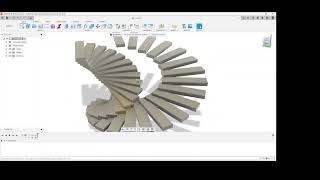
Commands
| Ribbon/Toolbar Icon | Command | Command Description |
|---|---|---|

|
JT Magic Revolve |
Advanced duplication and rotation tool for creating complex geometric patterns by rotating bodies around custom axes in Autodesk® Fusion®. |
Installation/Uninstallation
Install:
The installer that ran when you downloaded this app/plug-in from the Autodesk App Store will start installing the app/plug-in. Or, simply double-click the downloaded installer to install the app/plugin.
Uninstall:
You can unload the add-in without uninstalling it by clicking the "Stop" button when the add-in is selected in the list box on the "Add-Ins" tab of the "Scripts and Add-Ins" dialog.<br>
Unchecking "Run on Startup" causes the add-in not to be loaded in future sessions of Fusion.
To uninstall this plug-in, exit the Autodesk product if you are currently running it, simply rerun the installer, and select the "Uninstall" button.
Or, you can uninstall it from 'Control Panel/Programs and Features' (Windows), just as you would uninstall any other application from your system.
Additional Information
Technical Specifications
System Requirements:
- Autodesk® Fusion®
- Windows 10/11 or macOS 10.14+
- Minimum 4GB RAM (8GB recommended)
- OpenGL 3.3 compatible graphics.
Performance Optimizations: JT Magic Revolve includes advanced algorithms for handling complex geometries efficiently. Processing times scale linearly with body complexity and copy count. Typical operations on a single body complete in seconds, even with detailed models and high copy counts.
File Compatibility: Works with all native Fusion file formats and maintains compatibility with imported geometries from STEP, IGES, STL, and other supported formats.
Educational Resources:
- Documentation: https://jtplugin.github.io/fusion-magic-revolve/help.html
- Sample Projects: Available in plugin installation directory
- Community Support: GitHub Issues and Discussions.
Advanced Usage Tips: For complex patterns, consider breaking operations into smaller steps on individual bodies. The plugin maintains model history, allowing for iterative refinements. When working with large copy counts, use component instances in post-processing to optimize performance.
Developer: Giovanni Tommasi, specializing in Fusion automation tools since 2019. Part of JT Plugin Development, dedicated to enhancing designer productivity through intelligent automation at accessible prices.
License: Commercial license included with purchase. No subscription fees or ongoing costs.
Privacy Policy: https://jtplugin.github.io/privacy-policy Terms of Service: https://jtplugin.github.io/fusion-magic-revolve/terms_of_service
Known Issues
Reporting Issues: Please report any unexpected behavior to jtplugin@ajl.vision with model files and system specifications for rapid resolution.
Contact
Author/Company Information
Support Information
Community Support Available
Email Support: jtplugin@ajl.vision For technical issues and general inquiries
Documentation: Help page available at https://jtplugin.github.io/fusion-magic-revolve/help.html
GitHub Issues: Report bugs and request features at https://github.com/jtplugin/fusion-magic-revolve/issues
What We Support:
- Installation and setup assistance
- Technical troubleshooting and bug resolution
- Workflow optimization guidance
- Feature requests and enhancement suggestions
Before Contacting Support: Please include your Fusion version, operating system, and a detailed description of the issue. Screenshots or sample files help accelerate resolution.
Community: Join our user community for tips, tricks, and peer support through GitHub discussions and issues.
Commitment: Dedicated to providing quality tools for the Fusion community at accessible prices.
Version History
| Version Number | Version Description |
|---|---|
|
1.0.0 |
Initial release of JT Magic Revolve featuring core duplication and rotation functionality with custom axis support, batch processing capabilities, and comprehensive error handling for professional Fusion workflows. |
