
RayTracer
Mac OS, EnglishApereon Imaging LLC
A tool to perform 2D optical analysis in an Autodesk® Fusion® sketch. You can define refractive indices, lens surfaces, mirror surfaces, and light rays to trace through an optical system.
General Usage Instructions
Screenshots
Installation/Uninstallation
Additional Information
Known Issues
Contact
Version History
General Usage Instructions
- Create a 2D sketch of a lens/mirror system using lines and arcs.
- Draw rays at the desired incidence angle with the lens system.
- Open RayTracer and fill out the desired refractive indices for the full system.
- Select the rays, mirror surfaces, and lens surfaces.
- Press OK and wait for the result.
If the add-in doesn't load automatically, you can load it as follows:
Go to the [Utilities] tab → [Add-Ins] section → [Scripts and Add-Ins] → locate "RayTracer" and enable it. Done!
Screenshots


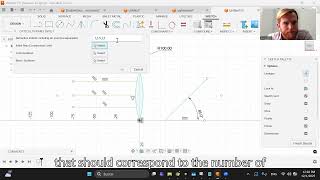

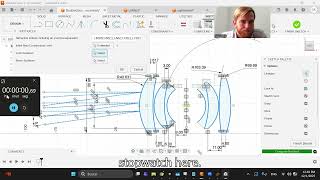
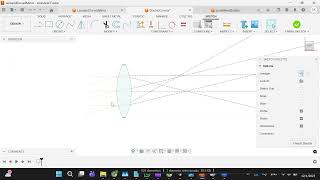
Commands
Installation/Uninstallation
Install:
- Download the installer from the Autodesk App Store.
- Right-click on the "Downloads" folder and select "Open in Finder".
- Right-click on the "RayTracer_macos.pkg" -> "Open With" -> "Installer".
Uninstall:
- You can unload the add-in without uninstalling it by clicking the "Stop" button when the add-in is selected in the list box on the "Add-Ins" tab of the "Scripts and Add-Ins" dialog.
- Unchecking "Run on Startup" causes the add-in not to be loaded in future sessions of Autodesk® Fusion®.
- Navigate to the ./ApplicationsPlugins folder and select the app bundle you want to uninstall
- Either drag the app bundle to the Trash or right-click and select “Move to Trash”
- Right-click on the Trash Can and select “Empty Trash”
- If you prefer keystrokes, you can also just select the app bundle and then hit Command+Delete to move the app to Trash, then empty the Trash and the app will be removed.
Additional Information
Ensure that initial rays are created with the end point constrained on the first surface.
Ensure that all lens and ray, and mirror sketches are fully constrained before running the program.
Known Issues
If angles are extreme, odd ray behavior can occur. Spline lenses or mirrors cannot be used.
Contact
Company Name: Apereon Imaging LLC
Company URL: https://www.Apereon.com
Support Contact: gavin@apereon.com
Author/Company Information
Apereon Imaging LLC
Support Information
Contact at https://www.apereon.com/contact, through the Autodesk app page, or email gavin@apereon.com.
Version History
| Version Number | Version Description |
|---|---|
|
1.0.0. |
First version (for MacOS). |
