
MCP Server for Autodesk® Fusion®
Win64, EnglishGeneral Usage Instructions
MCP-Link for Fusion enables AI agents to control Fusion through natural language commands.
Complete Workflow:
- Install the add-in in Fusion (auto-starts on Fusion launch)
- Download and run the free MCP-Link server from GitHub
- Connect your AI agent (ChatGPT, Claude, or custom) to the MCP server
- Issue commands through natural language
- Watch Fusion execute your designs in real-time
Example Commands:
- "Create a mounting plate with 4 holes, 10cm apart, 8mm diameter"
- "Add text PROTOTYPE and extrude it 5mm"
- "Generate a parametric bracket with 45-degree angles"
- "Query my AirfoilTools database for the best airfoil."
- "Store this design's mass and volume in SQLite"
- "Show me a pop-up with the analysis results."
Three Operation Modes:
- Generic API Calls - Execute any Fusion API method with simple JSON commands. Perfect for straightforward operations like creating sketches, adding geometry, or querying properties.
- Python Execution - Run complex workflows with full access to Fusion's API and all loaded add-ins. Enables multi-step operations, conditional logic, and integration with your existing add-ins.
- MCP Tool Integration - Access SQLite databases, browser automation, system control, AI models, user popups, and more. Combine Fusion operations with external tools for powerful workflows.
How It Fits Into Your Workflow:
The add-in provides an AI interface layer that sits alongside your normal Fusion workflow. You can continue using Fusion manually while also leveraging AI for:
- Rapid prototyping of design ideas through conversation
- Automating repetitive modeling tasks
- Testing API code and exploring capabilities
- Batch processing multiple designs
- Integrating with external databases and tools
- Teaching and learning Fusion API concepts
The add-in runs in the background and doesn't interfere with normal Fusion operation. It's always ready when you need AI assistance.
Screenshots
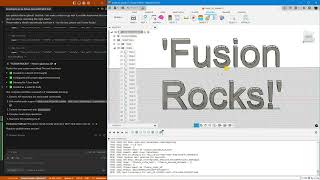


Commands
Installation/Uninstallation
Installation:
- Extract the ZIP file to a local directory
- Open Fusion
- Press Shift+S to open Scripts and Add-Ins
- Click the Add-Ins tab
- Click the green + button next to "My Add-Ins"
- Navigate to the extracted folder and select it
- Click Run (or check "Run on Startup" for automatic loading)
Uninstallation:
- Open Scripts and Add-Ins (Shift+S)
- Select MCP-Link from the list
- Click Stop
- Uncheck "Run on Startup" if enabled
- Delete the add-in folder from your system
The add-in installs to the location you choose during setup. No system files are modified.
Additional Information
Additional Resources:
- MCP-Link Server: github.com/AuraFriday/mcp-link-server/releases (required, free download)
- GitHub Repository: github.com/AuraFriday/Fusion-360-MCP-Server
- Model Context Protocol: modelcontextprotocol.io
- Fusion API Reference: Autodesk Fusion 360 API Documentation
- Demo Video: Watch AI create "Fusion Rocks!" in 3D
Technical Specifications:
- Built with Fusion native Python API (adsk.core, adsk.fusion, adsk.cam)
- Uses Server-Sent Events (SSE) for MCP connection with auto-reconnection
- JSON-RPC protocol for command execution
- TRUE INLINE Python execution (no sandboxing, full system access)
- Zero overhead on Fusion performance (runs in background thread)
- All operations run locally (no cloud dependencies, no telemetry)
- Compatible with Windows 10/11 and macOS 10.15+
- Supports both Intel and Apple Silicon Macs
What Makes It Unique:
- First MCP-based CAD tool (industry-standard AI protocol)
- 100% generic API access (no hardcoded commands)
- Cross-add-in access (AI can discover and use ANY loaded add-in)
- Python execution with the MCP tool calling (unprecedented integration)
License:
- Add-in: Custom EULA (free for personal and commercial use; Source is Open)
- MCP-Link Server: Custom EULA (free for personal and commercial use; Source is Open)
Privacy & Data:
- 100% local processing - no cloud services
- Zero data collection - no telemetry or analytics
- No external network calls (except to the localhost MCP server)
- Your designs never leave your computer
- GDPR, CCPA, and Australian Privacy Principles compliant
Community & Contributions:
- GitHub Discussions for questions and feature requests
- Active issue tracking and bug fixes
- User-contributed examples and workflows
- Pull requests welcome.
Known Issues
Known Limitations:
- This tool is currently recommended only for users with strong proficiency in AI usage and context management abilities; others are unlikely to get full benefit from this MCP tool until the “Help” MCP (see below) comes online.
- The AI can only do what it’s been trained on, which includes “figuring it out by itself” in cases where its knowledge is lacking – asking it to keep notes to remind itself how to do things better is a good idea (see above – proficient context-management-abilities notice)
- This tool will become “next level” with abilities to help you, when you connect it to the separate (announced but not yet shipped as I write this) Autodesk Help MCP Server https://www.autodesk.com/solutions/autodesk-ai/autodesk-mcp-servers
- Context is lost when add-in is reloaded (working as intended for session isolation)
- READ THE WARNINGS ON THE INHERANT RISKS OF AGENTIC AI AND YOUR DUTIES
- Python execution has full system access (use responsibly!)
Compatibility:
- Requires the MCP-Link server to be running
- Works with any MCP-compatible AI agent
- Compatible with all recent Fusion versions
For the latest updates and bug fixes, check the GitHub repository.
Contact
Author/Company Information
Support Information
Support Channels:
- GitHub: https://github.com/AuraFriday/Fusion-360-MCP-Server
- Email: ask@aurafriday.com
- Response Time: 24-48 hours for GitHub issues, 48-72 hours for email
Documentation:
- Complete README with examples
- API reference
- Video tutorials
- FAQ section
Community:
- GitHub Discussions for questions
- Active issue tracking
- User-contributed examples
For urgent issues, please use GitHub Issues with the "urgent" label.
Version History
| Version Number | Version Description |
|---|---|
|
1.2.73 |
Multiple new inbuilt mechanisms for AI to access API documentation and examples. |
|
1.2.72 |
Updated new release. |
