
EZ VDC Toolkit
Win64, EnglishGeneral Usage Instructions
Getting Started
1. Install the Plug-in :- Download and install the EZ VDC Toolkit from the Autodesk App Store.
2. Open Navisworks :- Launch Navisworks and open your desired project file.
3. Access the Toolkit :- Navigate to the EZ VDC Toolkit tab in the Navisworks ribbon.
4. Select a Module :- Choose one of the available tools:
- EZ Navigation
- EZ Clash Manager
- EZ Issue Viewer
Each module is designed to integrate seamlessly into your coordination workflow.
EZ Navigation – Controls & Usage
EZ Navigation enables FPS-style movement and productivity shortcuts inside Navisworks.
For smooth navigation, keep the left mouse button pressed while moving.
Navigation Controls
W – Move forward
A – Move left
S – Move backward
D – Move right
Q – Move down
E – Move up
Speed Controls
R – Increase movement speed
F – Reduce movement speed
Shift (hold) – Temporary speed boost
Measurement Tools
Z – Toggle measuring tool
X – Lock measurements to Z-axis
C – Lock measurements perpendicular to the surface
V – Measure the shortest distance between two selected objects
Space – Clear measurement
Annotation & Tool Toggles
1 – Toggle freehand tool
2 – Toggle annotation text tool
3 – Toggle erase tool
4 – Toggle section translate tool
Special Function
Double Left Click – Toggle “Align to Surface Section” to automatically orient the section plane to the selected surface.
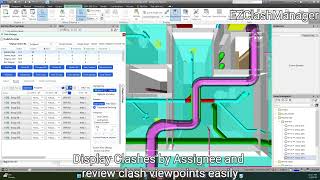
EZ Clash Manager – Usage Overview
EZ Clash Manager enhances the native Navisworks Clash Detective while maintaining a familiar interface.
Most core functionality mirrors native Navisworks behavior, with added automation and navigation tools.
Clash Navigation Shortcuts
While reviewing clashes in the list view:
W – Move up in clash list
S – Move down in the clash list
D – Mark clash as Reviewed
A – Mark clash as Approved
These shortcuts allow rapid clash review during coordination meetings without excessive mouse interaction.
Additional features such as grouping, automation, viewpoint creation, color control, and ACC issue creation are accessible directly within the EZ Clash Manager interface.
EZ Issue Viewer – Usage Overview
EZ Issue Viewer connects Autodesk Construction Cloud (ACC) Issues directly to Navisworks. You can:
- View linked issues
- Create new issues
- Edit issue properties
Sync issues with clashes
The interface is designed to be intuitive and consistent with standard issue management workflows.
Support & Help
If you experience any issues:
- Ensure you are using a supported version of Navisworks.
- Restart Navisworks after installation if the tab does not appear.
- Watch the official Quick Start video guide for a walkthrough of the features.
For additional support, please contact the support email listed on the Autodesk App Store page.
Screenshots


Commands
Installation/Uninstallation
The installer that ran when you downloaded this app/plug-in from the Autodesk App Store will start installing the app/plug-in. OR, simply double-click the downloaded installer to install the app/plugin.
To uninstall this plug-in, exit the Autodesk product if you are currently running it, simply rerun the installer, and select the "Uninstall" button. OR, click Control Panel > Programs > Programs and Features (Windows 10/11) and uninstall as you would any other application from your system.
Additional Information
Known Issues
Contact
Author/Company Information
Support Information
Please contact support via email: purrutia@alumni.stanford.edu
Version History
| Version Number | Version Description |
|---|---|
|
1.0.3 |
- New Release: Added support for Navisworks 2027 |
|
1.0.1 |
- Added the ability to modify the controls |
|
1.0.0 |
Nevizto is a Navisworks plug-in that lets you navigate within your model as it was an FPS game by using the WASD keys. In addition to navigation, it also adds shortcuts to the measuring and annotation tools! Coordinate your projects with better tools like Nevizto! |
