
Frame Prism
Win64, EnglishGeneral Usage Instructions
- Open Revit and click “Frame Prism” on the Frame ribbon tab.
- In the dockable panel, choose a Category (e.g., Walls).
- Choose a Parameter (e.g., Level).
- Click “Apply Colors” to color-code elements in the active view by parameter value.
- Review the legend table to see counts per value (including “None”).
- Click a legend row to isolate elements for that value, or multi-select rows to isolate the union.
- Click “Clear/Reset” to restore the view.
Screenshots
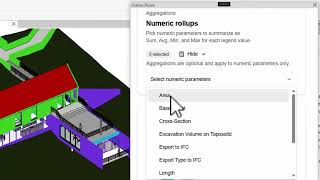


Commands
Installation/Uninstallation
The installer that ran when you downloaded this app/plug-in from the Autodesk App Store will start installing the app/plug-in. OR simply double-click the downloaded installer to install the app/plugin.
To uninstall this plug-in, exit the Autodesk product if you are currently running it, simply rerun the installer, and select the "Uninstall" button. OR click Control Panel > Programs > Programs and Features (Windows 10/11) and uninstall as you would any other application from your system.
Additional Information
System Requirements
- Revit 2026 (Windows 64-bit)
- WebView2 Runtime (usually pre-installed on Windows)
Notes
- Frame Prism applies view-only graphic overrides and can be reset at any time.
- For best performance, use it on a single category within the active view.
Documentation
- See the included Help PDF in the downloaded package.
Known Issues
- Temporary isolate may not be available in some view types or during active Revit commands; finish the current command and try again.
- Isolating elements inside Groups may require including all group members (Revit behaviour).
- Linked model elements may have limited support depending on view context.
- If WebView2 Runtime is missing, the UI may not render until WebView2 is installed.
Contact
Author/Company Information
Support Information
For support, contact us at contact@bimframe.co
Please include Revit version, app version, and steps to reproduce.
We typically respond within 5 business days.
Optional: add screenshots or a short screen recording.
Version History
| Version Number | Version Description |
|---|---|
|
1.0.0 |
Initial public release for Revit 2026. Includes dockable panel, category/parameter selection, stable color coding by value, legend counts (incl. None), isolate by legend row (single/multi), and clear/reset. |
