
Ball Valve(TH type) Inch Family File
Win64, EnglishGeneral Usage Instructions
1. Download and install the JFM Revit Family file using the installer provided from the Autodesk App Store.
During installation, JFM family file will be placed automatically in the designated Revit Library folders.
2. Open Autodesk Revit (2023–2026).
3. Navigate to the installed JFM library folder:
Go to Insert → Load Family
Then browse to the path:
C:\ProgramData\Autodesk\RVT XXXX\Libraries\JFM\
4. Load the family into your project and place it as you would with any standard Revit family.
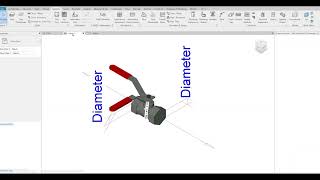
5. Use parameter controls (such as Visibility Settings, dimensional parameters, or configuration options) to adjust the family according to project requirements.
6. JFM family is optimized for lightweight performance, accurate geometry, and smooth coordination, making them suitable for clash detection and large-scale BIM environments.
Screenshots


Commands
Installation/Uninstallation
Installation (General JFM Revit Family file Version)
The JFM Revit Family file is installed using the provided MSI installer.
During installation, JFM family is automatically copied into the appropriate Revit Library folders under:
C:\ProgramData\Autodesk\RVT XXXX\Libraries\JFM\
(XXXX corresponds to the installed Revit version, such as 2023, 2024, 2025, or 2026.)
After installation, users can access the family in Revit by selecting:
Insert → Load Family,
then navigating to the installed JFM library folder.
A Start Menu folder is also created under:
Start Menu → JFM Design → Revit Family file
This folder includes:
-
A shortcut to uninstall the JFM Revit Family file
-
Shortcuts to directly open the installed JFM library folder for each supported Revit version
This structure ensures easy access to the installed content and simplifies both usage and removal.
Additional Information
Known Issues
Contact
Author/Company Information
Support Information
For product support, questions, or feedback regarding the JFM Revit Family file, please contact us via email:
We provide support for:
- Installation or uninstallation issues
- Guidance on loading and using the families within Revit
Support is available Monday to Friday, 10:00 AM – 6:00 PM (local time).
We aim to respond to all inquiries within 2 business days.
Version History
| Version Number | Version Description |
|---|---|
|
1.0.1 |
Initial Release This is the first official release of the JFM Revit Family file. It provides a Revit family optimized for MEP and piping design workflows. The package includes essential standardized components, with ongoing updates planned to expand the library with additional parts such as valves, fittings, and bolts. Supports both metric (mm) and imperial (inch) unit systems. Fully optimized and tested for Revit 2023–2026. Includes a built-in MSI installer for seamless installation and uninstallation across all supported Revit versions. |
