
Greater BIM
Win64, EnglishGeneral Usage Instructions
- To use the tool, simply split the duct, pipe, cable tray, or conduit at your desired location.
- Next, select the segment between two fittings.
- Then execute the Bend command to create the bend.
Screenshots
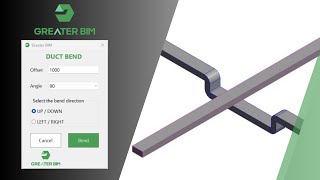
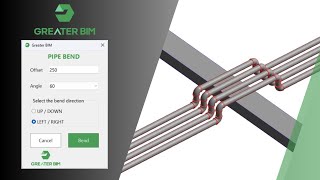

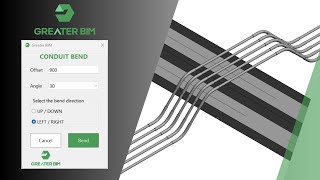
Commands
Installation/Uninstallation
The installer that ran when you downloaded this app/plug-in from the Autodesk App Store will start installing the app/plug-in. OR, simply double-click the downloaded installer to install the app/plugin. Make sure that the Autodesk product is completely closed when running the installer.
To uninstall this plug-in, exit the Autodesk product if you are currently running it, simply rerun the installer, and select the "Uninstall" button. OR, click Control Panel > Programs > Programs and Features (Windows 10/11) and uninstall as you would any other application from your system.
Additional Information
Known Issues
Contact
Author/Company Information
Support Information
If you need assistance with installation, licensing, or usage of the Greater BIM add-in, our support team is here to help. You can reach us by email at hello@greaterbim.com.
We aim to respond to all support requests within 1–2 business days. Please include your name, license key (if applicable), Autodesk® Revit® version, and a brief description of the issue to help us provide faster assistance.
Support is available Monday to Friday, 9:00 AM – 5:00 PM (UK time). Outside of business hours, you can still send your request, and it will be addressed on the next working day. For product updates, FAQs, and additional resources, please visit our website at www.greaterbim.com
Version History
| Version Number | Version Description |
|---|---|
|
1.0.0 |
Initial release of Greater BIM. Added 4 commands: Duct Bend, Pipe Bend, Cable Tray Bend, and Conduit Bend. Bend services up, down, left, and right at standard angles (30°, 45°, 60°, 90°). Works seamlessly in both 2D and 3D views. Designed to save time and improve accuracy for BIM Modelers, Coordinators, and MEP Engineers. |
