
Cloud Manager
Win64, EnglishGeneral Usage Instructions
- Open Clash Report
- Use the “Import Clash Report” button to load an XML report exported from Navisworks.
- Clash Navigation
- Browse through individual clash results using the Clash List Panel.
- Select a clash to automatically highlight the involved elements in your Revit model.
- View Management
- Click “Section Box” to create a 3D section view centred around the selected clash.
- Clash Element Interaction
- Automatically zoom, select, and highlight the clash elements directly in the Revit model.
- Navisworks Images.
Screenshots


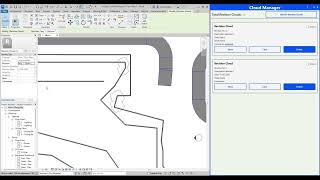
Commands
Installation/Uninstallation
The installer that ran when you downloaded this app/plug-in from the Autodesk App Store will start installing the app/plug-in. OR, simply double-click the downloaded installer to install the app/plugin. Make sure that the Autodesk product is completely closed when running the installer.
To uninstall this plug-in, exit the Autodesk product if you are currently running it, simply rerun the installer, and select the "Uninstall" button. OR, click Control Panel > Programs > Programs and Features (Windows 10/11) and uninstall as you would any other application from your system.
Additional Information
Known Issues
Contact
Author/Company Information
Support Information
For support, feature requests, or to report bugs, please get in touch with our team:
Email: m.hassen@hexainnovation.com
Website: www.hexainnovation.com
LinkedIn: https://www.linkedin.com/company/hexainnovation/
We strive to respond within 1–2 business days.
Version History
| Version Number | Version Description |
|---|---|
|
1.0.0 |
Cloud Manager provides a streamlined set of tools that allow users to: View and manage all Revision Clouds from a single interface. Instantly open the view associated with a selected revision cloud. Select and highlight revision clouds directly in the model. Clean and reset revision cloud comments for better documentation control. Safely delete revision clouds with automatic model and UI synchronization. Track the total number of revision clouds in real time. |
