
K-D2 PLANNER
Win64, EnglishKOBELCO CONSTRUCTION MACHINERY CO., LTD.
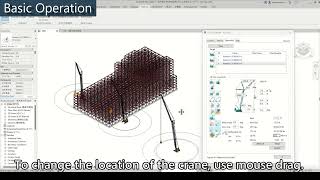
K-D2 PLANNER is a crane lift-planning and simulation add-in for Autodesk® Revit®. It allows you to easily perform lifting simulations such as capacity verification and collision checks.
General Usage Instructions
Launch the app by clicking [K-D2Planner] in the [Add-ins] tab.
- Use the Crane Operation tab to place, operate, and review cranes.
- Use the Crane Search tab to search for the class and specifications of the crane to be placed.
- Use the Task Management tab to record and recall review results.
Screenshots


Commands
Installation/Uninstallation
◆Installation
Download the installer from the Autodesk App Store.
Double-click the installer to install the app.
◆Uninstall
[Go to Settings] > [Apps] > [Apps & Features] > Uninstall K-D2 PLANNER from the list.
Additional Information
Known Issues
Contact
Company Name: KOBELCO CONSTRUCTION MACHINERY CO., LTD.
Support Contact: k-d2.support@kobelco.com
Author/Company Information
KOBELCO CONSTRUCTION MACHINERY CO., LTD.
Support Information
Version History
| Version Number | Version Description |
|---|---|
|
1.5.6.1 |
1.5.6.1 - This version has the same features as the product version sold in Japan, with the display language set to English. It is intended for use in the United States, and units of measurement and other settings have been adjusted for use there. |
