
INFINITY Suite
Win64, EnglishGeneral Usage Instructions
General Usage Instructions
To start using the INFINITY Suite, navigate to the custom "INFINITY" tab on the Revit Ribbon.
-
Activation: Click the "User Account" button to create a free account or log in. This will automatically activate your 30-Day Free Trial.
-
Automation: Open "Script Runner" to execute custom Python or C# scripts directly within the model.
-
Protection: Configure "Auto Save" to set up silent background saving or popup reminders.
-
Documentation: Use "Sheet Manager" to bulk create sheets from Excel or duplicate existing sheets with views. Use "Revision Manager" to add/remove revisions across multiple sheets instantly.
-
Output: Use "Print Manager" (Revit 2022+) to batch export sheets to PDF or DWG with auto-naming and size detection.
-
Calculate: The "Time Summary" tool runs in the background to calculate active working hours per project for accurate billing reports.
Screenshots
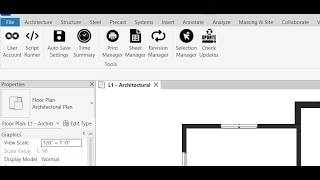


Commands
Installation/Uninstallation
The installer that ran when you downloaded this app/plug-in from Autodesk App Store will start installing the app/plug-in. OR, simply double-click the downloaded installer to install the app/plugin. You may need to restart the Autodesk product to activate the app/plug-in.
To uninstall this plug-in, exit the Autodesk product if you are currently running it, simply rerun the installer, and select the "Uninstall" button. OR, click Control Panel > Programs > Programs and Features (Windows 10/11) and uninstall as you would any other application from your system.
File Locations: The plugin files are installed in:
%ProgramData%\Autodesk\Revit\Addins\20xx\INFINITY\
Additional Information
Privacy Policy: We respect your data. Our full privacy policy regarding user account data and crash reporting can be viewed here: https://github.com/infinity-plugin/infinity-privacy-policy/blob/main/INFINITY%20Privacy%20Policy.pdf
System Requirements:
-
OS: Microsoft® Windows® 10 or 11 (64-bit).
-
Revit Versions: 2021, 2022, 2023, 2024, 2025, 2026.
-
Internet: Required for license activation and updates.
Known Issues
Print Manager Availability: The Print Manager tool is available for Revit 2022 and newer. It is disabled in Revit 2021 due to API limitations in that specific version. All other tools in the suite (Script Runner, Auto Save, Sheet Manager, etc.) are fully functional in Revit 2021.
Contact
Author/Company Information
Support Information
For technical support, bug reports, feature requests, or licensing inquiries, please contact our support team. We aim to respond to all inquiries within 24 hours.
-
Email: Support@HorizonBimServices.com
-
Website: https://www.HorizonBimServices.com
Version History
| Version Number | Version Description |
|---|---|
|
1.0.0 |
First public release of the INFINITY Suite. Includes: Script Runner (Python & C#), Auto Save, Time Summary, Sheet Manager, Revision Manager, and Selection Manager. Print Manager included for Revit 2022 and newer. Full support for Revit 2021, 2022, 2023, 2024, 2025, and 2026. |
