ExcelLink
Description
ExcelLink for Autodesk® Revit®is a productivity add-in that bridges Revit and Microsoft Excel, giving architects, engineers, and BIM coordinators full control over element parameter data — without scripting, without manual copy-pasting, and without leaving their workflow.
Export Parameters to Excel in Seconds
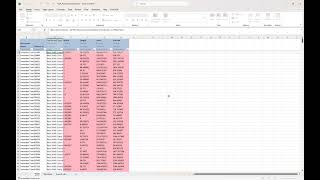
Select one or more Revit categories, choose the parameters you need, and export to a professionally formatted Excel workbook with a single click. Each parameter appears as a clearly labeled column, with built-in color coding that instantly identifies read-only values, type parameters, and parameters that do not exist on a given element. Linked Revit documents are fully supported — elements from linked files are included and visually distinguished in the output.
Export to separate sheets per category, or consolidate everything into a single worksheet. The column order in Excel matches exactly the order you define in the interface, giving you complete control over the output structure.
Write Values Back to Revit
ExcelLink is not just an export tool. After reviewing or editing parameter values in Excel, you can import the file back into Revit and write updated values directly to the matching elements — no manual entry required. The import engine uses each element's unique identifier to match rows precisely, even across large models. Only instance parameters that are not read-only are written back, ensuring that system parameters and type-level values are never accidentally modified.
Save and Reuse Your Configuration
Working with the same set of categories and parameters every week? Save your selection to a configuration file and reload it in one click. Configuration files store parameter identifiers rather than names, making them robust across model versions and project phases.
Designed for Real BIM Workflows
ExcelLink was built with the realities of production BIM work in mind. The interface provides instant parameter filtering by type — instance, type, or read-only — so you can navigate large parameter lists quickly. The status bar shows live counts of selected categories and parameters at all times. The add-in operates entirely within the Revit session, with no external dependencies beyond the license server connection.
License and Compatibility
ExcelLink is a licensed add-in with a subscription model. A trial mode is available for evaluation, allowing export of up to 10 elements per category. The add-in operates offline with a grace period of up to 30 days from the last successful license check, ensuring uninterrupted use in environments with restricted internet access.
Compatible with Revit 2022, 2023, 2024, 2025, 2026 and 2027 on Windows 10 and Windows 11 (64-bit).
Key Features
- Export selected Revit parameters to Excel with one click
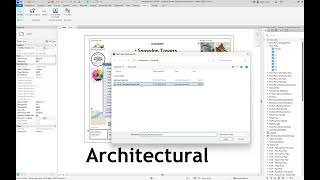
- Import updated values from Excel back into Revit
- Support for instance and type parameters across multiple categories
- Linked document support with visual distinction of linked elements
- Per-category sheets or a single consolidated worksheet
- Parameter filtering by instance, type, and read-only status
- Drag-and-drop parameter reordering to control column order
- Save and load parameter selection configurations
- Offline grace period for environments without constant internet access
- Compatible with Revit 2022 through 2027.
Trial Description
This is a trial version. It is limited to exporting parameters of 10 elements until you get a valid license.
To get a license, contact ahuzuner@gmail.com
For price info visit: https://halukuzuner.github.io/revit-excel-link/index.html