
AG Height Manager
Free
OS:
Language:
Description
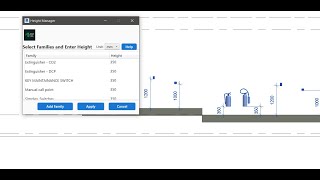
AG Height Manager for Autodesk® Revit®
AG Height Manager is a powerful Revit add-in that automates and simplifies the process of adjusting family instance elevations within your projects. It enables users to define precise height offsets using flexible unit options and automatically reposition selected families relative to floors, roofs, or structural elements — ensuring accuracy, consistency, and efficiency across the model.
Key Features:
- Automatically adjust the elevation of selected family instances.
- Supports multiple height units: millimeters (mm), centimeters (cm), meters (m), and feet (ft).
- Assign different height values to multiple families in a single operation.
- Uses model geometry such as floors, roofs, and structural framing as reference levels.
- Intuitive, user-friendly interface seamlessly integrated into the Revit environment.
Enhance your BIM workflow and achieve accurate, consistent family placement with flexible unit control using AG Height Manager.



An Excellent addin and very helpful.. thank you.
Thank you Bilal for your feedback.
i recommend this tool as it save hundreds of hours
Thank you Sajeev for your feedback.
an Excellent addin and very helpful.. thank you.
Thank you Khaled for your feedback.
This tool is awesome.
Save me tons of time
Thank you Abdelrahman for your feedback.