
Electrical Panels Manager
Description
Electrical Panels Manager — Auto-Calculate, Name & Export Your Panels in Seconds
Are you still manually reading Revit panel schedules, opening Excel, typing CB ratings one by one, and praying you didn't miss a panel?
That ends today.
Electrical Panels Manager is the only Revit plugin that finds all your electrical panels automatically, calculates their current ratings from connected loads, names them by floor and reference code, sizes their feeder cables per IEC standards — all in one window, in under a minute.
WHAT IT DOES
Auto-Find Panels Open the tool and it instantly detects every electrical panel in your active view. Switch to whole-project mode to scan everything at once. No manual selection, no filtering.
Auto-Calculate Mains & CB Rating The tool reads the connected load directly from Revit, applies the IEC 60364-4-43 safety factor (125%), accounts for voltage and power factor, and sets the correct Mains and CB rating automatically. One click for all selected panels simultaneously.
Smart Auto-Naming Stop typing "DB-GF-01", "DB-GF-02" manually. Set your prefix, separator, and starting index once — the tool names every panel on every floor automatically, grouped by level or location reference.
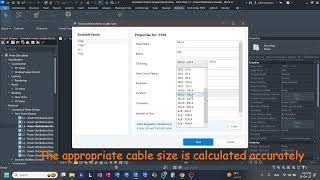
IEC Cable Sizer (Built-In) Select a panel, enter the cable run length, and get an instant IEC 60364-5-52 compliant cable size recommendation — including conductor cross-section (Cu/XLPE 4-core), voltage drop percentage, protection device type (MCB / MCCB / ACB per IEC 60898 / IEC 60947-2), and installation method derating (clipped, conduit, buried).
Export to CSV Export all panel data — names, CB ratings, voltage drop, and cable sizes — to a clean spreadsheet with one click. Ready to attach to your submittals or share with the client.
BUILT FOR REAL ENGINEERING PRACTICE
- Supports 3-phase (400V) and single-phase (230V) systems
- CB ratings follow IEC standard series: MCB up to 125A, MCCB up to 630A, ACB up to 6300A
- Cable ampacity table per IEC 60364-5-52, Method B1, XLPE 90°C
- Resistance and reactance values at 90°C operating temperature per IEC 60228
- Works on Panel Schedule Views and standard floor plan / 3D views
- Multi-select panels for batch calculation
- Section Box zoom — click any panel to isolate it instantly in your 3D view
HOW MUCH TIME DOES IT SAVE?
A typical project with 20 panels takes 2–3 hours to process manually: reading loads, calculating currents, sizing cables, naming panels, updating parameters, exporting schedules.
With Electrical Panels Manager: under 5 minutes.
That's time you can spend on the next project — or leave the office early.
WHO IS IT FOR?
- MEP Engineers doing LV electrical design in Revit
- BIM Engineers responsible for the electrical model data
- Electrical consultants who deliver IEC-compliant documentation
- Anyone tired of doing the same repetitive parameter editing on every project




I recommend this tool as it save hundreds of hours
Thanks, Abdelrahman, for your opinion.
Good idea
Thanks, Rehab, for your opinion.
I couldn't believe that this tool has such power in the designing and drafting stages of my project until I tried it myself and worked with its powerful and accurate tools.
Good tool saves me hours of working and calculations.
This too is amazing, it facilitates working with the electrical panels and calculating short circuit currents and voltage drop. Also it saves me hours of hard working.