
BlockApps
免费
操作系统:
语言:
描述
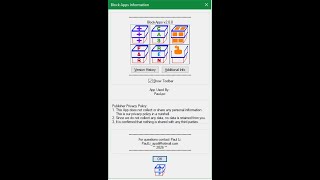
BlockApps adds the following six powerful Block name management commands to Autodesk® AutoCAD®:
(1) DDBlkAdd - Places in a list box Block Names to Add: Prefix/Suffix/Both
(2) DDBlkCas - Places in a list box Block Names to Change: 1st Letter to Uppercase/All Uppercase/All Lowercase
(3) DDBlkF&R - Places in a list box Block Names to Find & Replace matching characters at: Start/End/All of Block Name
(4) DDBlkRen - Renames a Block's name when picked from the graphic screen or popup list
(5) DDBlkCat - Creates a Block Catalog exported in one of the following formats: dwg, sld, dwf, dwfx or pdf
(6) DDExport – Saves a specified area of drawing exported in one of the following formats: sld, dwf, dwfx or pdf
关于此版本
版本 2.0.0, 2026/3/26
Changes:
(1) Added DDBlkCat.lsp
(2) Added DDExport.lsp
(3) Modified DDBlkRen.lsp to support implied and multiple object selection
(4) Modified BlkAppsInfo.lsp to include “Additional Info” button



sorry,重启CAD后,工具栏重新出现了,谢谢
glad everything is working now...cheers!!!
为什么更新1.1后,工具栏面板不再显示四个快捷面板?在add-in里面也不会显示,只有在APP manager里面才会显示有这个插件,虽然输入快捷命令能使用,但是任然怀念V1.1的图形界面,可以直接点一点!
The Ribbon under Add-ins should still show the Block Apps panel with the command icons. To make sure the app menu is loaded at the command prompt, enter CUILOAD You should see in the list box @THEOFFICE_BLKAPPS If you don't, click Load, then under the Support folder that appears, scroll down the list and select blkapps.cuix and then Open
Big help!
Glad this app is helping you.
2016 don't know why not work.2020 work
This app only confirmed to work from 2019 to 2024.
Great tool, recommend! Very easy and useful!
glad you find the app helpful...cheers!!!