
Solid Subtract
Descripción
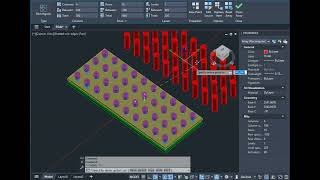
The Solid Subtract (SSub) and Subtraction with Gap (GAP) commands allow you to subtract one solid from another, make holes, and slots. Like the regular _Subtract command, the A>V>C> commands work with 3D-solids, regions, and surfaces. The A>V>C> commands have many additional features and settings that are not available in the standard command.
Command capabilities
-
You can process multiple objects at once: solids, regions, surfaces, blocks, and arrays.
-
You can automatically call the command to convert meshes to solids (MeshToSolid) and thus subtract meshes, polygon meshes, body objects, polylines, and circles with 3D thickness.
-
The results of processing are not glued into one solid.
-
Every selected solid hole is subtracted from each selected solid part. One solid hole can pierce multiple solid parts at once. This does not require making copies of solid holes.
-
The parts selected in the drawing before calling the command are processed.
-
You can prohibit deleting the original solid parts.
-
You can prohibit deleting the subtracted solid holes.
-
You can immediately create a gap around the subtracted part, which is convenient for modeling detachable connections. This option is available in a separate command, Gap, and the Solid Subtract command always subtracts without a gap, so as not to accidentally make an erroneous gap.
-
Even solids located inside blocks, nested blocks, and arrays are subtracted. Thus, you can make an array of holes in 1 command call.
-
And vice versa, you can enable subtraction from blocks. That is, you can make holes in all parts of a block using a hole solid located in the model space.
-
The commands do not change the material and color of the solid, nor do not erase the coloring of the faces of the solid part, as the usual subtraction command does.
-
The color of the hole solids is not transferred to the faces of the solid part.
-
You can assign a layer for the subtraction results. In this case, all the properties of the original body will be replaced by ByLayer.
-
All settings are available in the settings dialog and the AvcOptions palette, and the gap can be set in the command line too.
-
You can create up to 9 command setting styles and quickly switch them in the command line or a macro.
-
If you want to subtract part of the contours (polylines) as you do with solids, then there is a program for you called Curve Subtract.
The A>V>C> Solid Subtract plugin also includes the Solid Intersect (SInt) and Solid Union (SUnion) commands. The Drilling (DRI) command is not included in the A>V>C> Solid Subtract plugin and has its own separate settings, although it does the same job.
Regardless of the Autodesk® AutoCAD® localization language, you can switch the plugin to English, Italian, German, Russian, Chinese (PRC), Spanish, French, or Turkish localization.



Is this command complitly replace a Drill?
Yes, the SSub command can be used for the same purposes as the AVC Drill plugin (DRI command). However, SSub requires you to select the subtractive solid separately, while DRI finds subtractable solids by their layer. If layers haven't been assigned yet, it's easier to use SSub.
Subtracts holes through multiple solids at once, even inside blocks. Work well for me, thanks
Thanks for the feedback