
SolarCheck
Win64, Polski (Polish)Ogólne instrukcje korzystania
Sprawdź listę pytań w sekcji FAQ tutaj: https://appsaecdesign.com/faq_solarcheck
Przy pierwszym uruchomieniu dodatku należy wyrazić zgodę na załadowanie rodziny SUN_Target.
Umieść obiekt SUN_Target na oknach/ścianach za pomocą polecenia Komponent.
Przygotuj widok 3D – ustaw w Sun Settings opcję „Single Day” dla wybranej daty i zakresu godzin.
Elementy, które pozostaną widoczne w widoku, zostaną uwzględnione w analizie (ukryj wszystkie niepożądane elementy).
ruchom aplikację. Pierwszym krokiem jest wskazanie wybranego obiektu SUN_Target (lub kilku jednocześnie) i potwierdzenie wyboru.
Analiza zostanie wykonana po naciśnięciu przycisku RUN.
Wyniki analizy zostaną zapisane w parametrach SUN_Target oraz okna, jeśli Target został „przypięty” do okna.
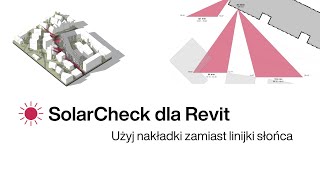
W projekcie zostaną wygenerowane wyniki graficzne w postaci przestrzennych i płaskich trójkątów, zawierające również informacje o konkretnym obszarze nasłonecznienia.
Zrzuty ekranu


Polecenia
Instalowanie/odinstalowanie
Aplikacja instaluje się w katalogu dodatków programu Autodesk® Revit®:
„C:\ProgramData\Autodesk\Revit\Addins\202#\SolarCheck”.
Odinstalowanie odbywa się w standardowy sposób: przejdź do Panelu sterowania, znajdź aplikację SolarCheck (kliknij prawym przyciskiem myszy) i wybierz opcję Odinstaluj.
Informacje dodatkowe
Znane problemy
Kontakt
Informacje o autorze/firmie
Informacje o pomocy technicznej
W przypadku problemów z aktywacją lub działaniem aplikacji prosimy o wypełnienie formularza:
https://forms.office.com/Pages/ResponsePage.aspx?id=9B5xvUtm30CDa-LOOcUaQKQb2muXqCpJrWm92d-rdfxUOTkwSEhLM1BVNk1LMTNFUjdWQkVNTVJRMi4u
lub kontakt mailowy: info@aecdesign.pl
Historia wersji
| Numer wersji | Opis wersji |
|---|---|
|
1.2.0 |
Initial Release |
