
Package Ideate Software – Version d'évaluation


Digitally signed app
Description
En déployant Ideate Software à grande échelle, les entreprises optimisent leur retour sur investissement et améliorent leur rentabilité. Installez l’ensemble des solutions Ideate Software via un seul téléchargement et permettez à vos équipes de réduire le temps consacré aux tâches chronophages dans Autodesk® Revit®. Ideate Automation est disponible en téléchargement séparé.
Ideate BIMLink est une solution puissante de gestion des données Revit permettant d’exporter et de réimporter rapidement et précisément de grands volumes d’informations issues des modèles Architecture, Structure ou MEP vers Microsoft® Excel®.
Ideate Explorer offre une méthode simple, intuitive et performante pour rechercher, filtrer, quantifier et sélectionner les éléments d’un modèle Revit, facilitant l’analyse et la manipulation des données du projet.
Ideate Sticky permet de lier et de mettre à jour facilement des données non BIM provenant de fichiers Excel, Word ou PDF directement dans les projets Revit.
Ideate StyleManager répond aux problématiques de gestion des styles Revit en aidant à éliminer les styles inutilisés ou dupliqués, sources d’erreurs, de confusion et de problèmes de performance.
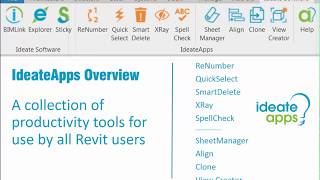
IdeateApps est une suite d’outils dédiée à l’amélioration de la productivité des équipes, incluant Ideate Renumber, QuickSelect, SmartDelete, XRay, SpellCheck, Annotate, SheetManager, Clone, Align et ViewCreator. Ces applications permettent notamment d’identifier les conflits d’annotations 2D, de créer des règles d’étiquetage intelligentes, de renuméroter les éléments et d’automatiser les tâches répétitives liées aux feuilles et aux vues.
Remarque : Cette application utilise un installateur personnalisé (et non l’installateur standard de l’App Store).
Description de l'essai
La version d'essai de comprend l'accès à chacun des cinq produits. Ideate Explorer, IdeateApps et Ideate Sticky fonctionnent pleinement. Ideate BIMLink a une limite de 25 lignes pour l'exportation de données. Ideate StyleManager se limite à tester ces trois styles : styles de motifs de lignes, de matériaux et d'apparence des matériaux.





Great tools Autodesk needs to create similar tools.
Why these application functions haven't been replicated, bundled or bought out into Revit itself astounds me. They simply transform the process of using Revit from a data perspective entirely into one that is 100% more automated, feasible and enjoyable.
Any company that has the desire and appetite for efficiency with pay off the cost of the applications in no time, and they offer some great network lisence solutions as well so that users can access the applications at different times across many machines. At most firms when the lisences cap out I simply just wait for one to free up - it's impossible to bring myself to do workflows without these tools sometimes!
Ideate's suite of tools is indispensable at our firm. There are so many tasks that are made more efficient, and many tasks that would just be flat out impossible without these tools. Ideate does a fantastic job at listening to their customers and they implement suggestions and feature requests quite rapidly. I have been using their products for more than 6 years and highly recommend all of them.
The Ideate suite of tools are one of very few tools I've come across for Revit that do excactly what they're supposed to, without spamming your toolbars with useless gizmos.
Some of the simpliste tools like Explorer are real game changers in how it lets you interact with models.
I use, and love, every one of the Ideate tools, and teach my teams about their usage also. Highly reccomended.
I recommend every firm within AECO that uses Revit to invest in the Ideate Software Bundle. Not only does the software make Revit users more efficient within the program, allowing for advanced communication with Revit itself, it also has a user interface that is second to none. All Ideate applications are essential for every Revit user to be able to utilize on a daily basis - BIMLink for interaction with Revit data through Excel, Sticky to bring in static Excel data to a Revit sheet, Explorer to analyze the model in an advanced way, etc.